PostgreSQL Hybrid Search for RAG: Combine Keywords and pgvector

A practical retrieval design for AI applications that need exact terms and semantic matches, with SQL, index choices, and quality checks.
Imagine a reader asks your documentation assistant: “Why does error PG-2047 appear after checkout?” A vector search may find passages about checkout failures even when they use different words. A keyword search can find the exact error code. The best retrieval system can use both.
Retrieval-augmented generation, or RAG, searches your own content before asking a model to answer. If retrieval misses the right passage, a better prompt will not reliably fix the answer. PostgreSQL can store the documents, a full-text search index, and vector embeddings together, which is a useful starting point for teams already operating Postgres.
What each search method contributes
PostgreSQL full-text search converts text into searchable tokens with tsvector and accepts queries through tsquery functions. It is strong at names, identifiers, and explicit terms. Embedding search represents the meaning of a passage as a vector, so it may match a question even when the passage uses different wording. Neither method guarantees a correct answer on its own.
The pgvector project adds vector types and distance operators to PostgreSQL. It supports exact nearest-neighbor search by default and optional approximate indexes, including HNSW and IVFFlat. Approximate search trades some recall for speed, so measure it against your own data before adding an index.
A small schema to start with
The vector dimension must match the embedding model you choose. The vector(768) below is an example, not a universal setting. Store a model identifier so that an embedding-model change does not silently mix incompatible vectors.
CREATE EXTENSION IF NOT EXISTS vector;

CREATE TABLE article_chunks (
    id bigserial PRIMARY KEY,
    article_id bigint NOT NULL,
    language_code text NOT NULL,
    heading text NOT NULL,
    body text NOT NULL,
    embedding_model text NOT NULL,
    embedding vector(768),
    search_text tsvector GENERATED ALWAYS AS (
        to_tsvector('english', coalesce(heading, '') || ' ' || coalesce(body, ''))
    ) STORED
);

CREATE INDEX article_chunks_text_idx ON article_chunks USING gin (search_text);
CREATE INDEX article_chunks_article_idx ON article_chunks (article_id);
For a multilingual site, do not apply the English text-search configuration to every language. Partition by language or maintain a language-aware text-search column and query policy. The example keeps the SQL short enough to explain the retrieval idea.
Generate embeddings in a background job after content is published or updated. Use stable chunk identifiers and update or remove old chunks when an article changes. An out-of-date index can produce a fluent answer grounded in obsolete text.
Retrieve candidates from both paths
For an English-language query, keyword retrieval can use websearch_to_tsquery, and vector retrieval can order by cosine distance. Bind user input and the query vector as parameters; do not concatenate either into SQL.
-- Keyword candidates
SELECT id, article_id, heading, body,
       ts_rank_cd(search_text, websearch_to_tsquery('english', :question)) AS score
FROM article_chunks
WHERE language_code = 'en'
  AND search_text @@ websearch_to_tsquery('english', :question)
ORDER BY score DESC
LIMIT 20;

-- Semantic candidates; :query_embedding must match vector(768)
SELECT id, article_id, heading, body,
       embedding <=> :query_embedding::vector AS distance
FROM article_chunks
WHERE language_code = 'en' AND embedding IS NOT NULL
ORDER BY embedding <=> :query_embedding::vector
LIMIT 20;
These are two candidate queries, not a finished ranking system. The raw keyword score and vector distance are on different scales. A simple first merge is reciprocal rank fusion: assign each result a rank in each list and sum 1 / (k + rank) for the lists where it appears. Pick k as a tuning parameter, deduplicate by chunk ID, then inspect the highest-ranked passages manually. Avoid declaring one set of fixed weights “best” without measuring on your questions.
When to add an HNSW index
Start with exact vector search and record query latency and the quality of the top results. When the vector path becomes too slow, pgvector can use an HNSW index for cosine distance:
CREATE INDEX article_chunks_embedding_hnsw_idx
ON article_chunks USING hnsw (embedding vector_cosine_ops);
HNSW can improve query speed, but it costs memory and build time, and approximate search can change which results appear. The operator class must match the distance operator you query. Use EXPLAIN (ANALYZE, BUFFERS) on realistic queries, particularly if you filter by tenant, language, publication status, or category. See the pgvector indexing guidance for current options.
Turn passages into grounded answers
Give the model the selected passages with their article IDs, titles, and stable URLs. Tell it to answer only from those passages, cite the passages it used, and say when the evidence is missing. Enforce access control before retrieval: a citation is not a substitute for checking whether the user may see a document.
Keep the retrieved context short enough to be useful, and log source IDs, retrieval scores, and answer outcomes. Review questions where no answer was found, a citation was wrong, or an exact identifier was missed. Those examples will tell you whether to improve chunking, keyword parsing, embeddings, or ranking.
What to measure before launch
Build a set of real questions with known source passages. Compare keyword-only, vector-only, and merged retrieval using recall in the top five, citation correctness, latency, and cost. Include exact codes, paraphrases, multiple languages, and documents the current user must not see.
Hybrid search is a retrieval strategy, not a promise of accuracy. Its value is that exact terms and semantic matches can reinforce each other, while your application keeps control over permissions, freshness, and the final answer.
Sources
Featured Articles

YOLO Object Detection: A Complete Practical Guide for Developers
A developer-focused, end-to-end guide to YOLO object detection covering core concepts, datasets, training, evaluation, real-time inference, deployment, optimization, production risks, and interviews.
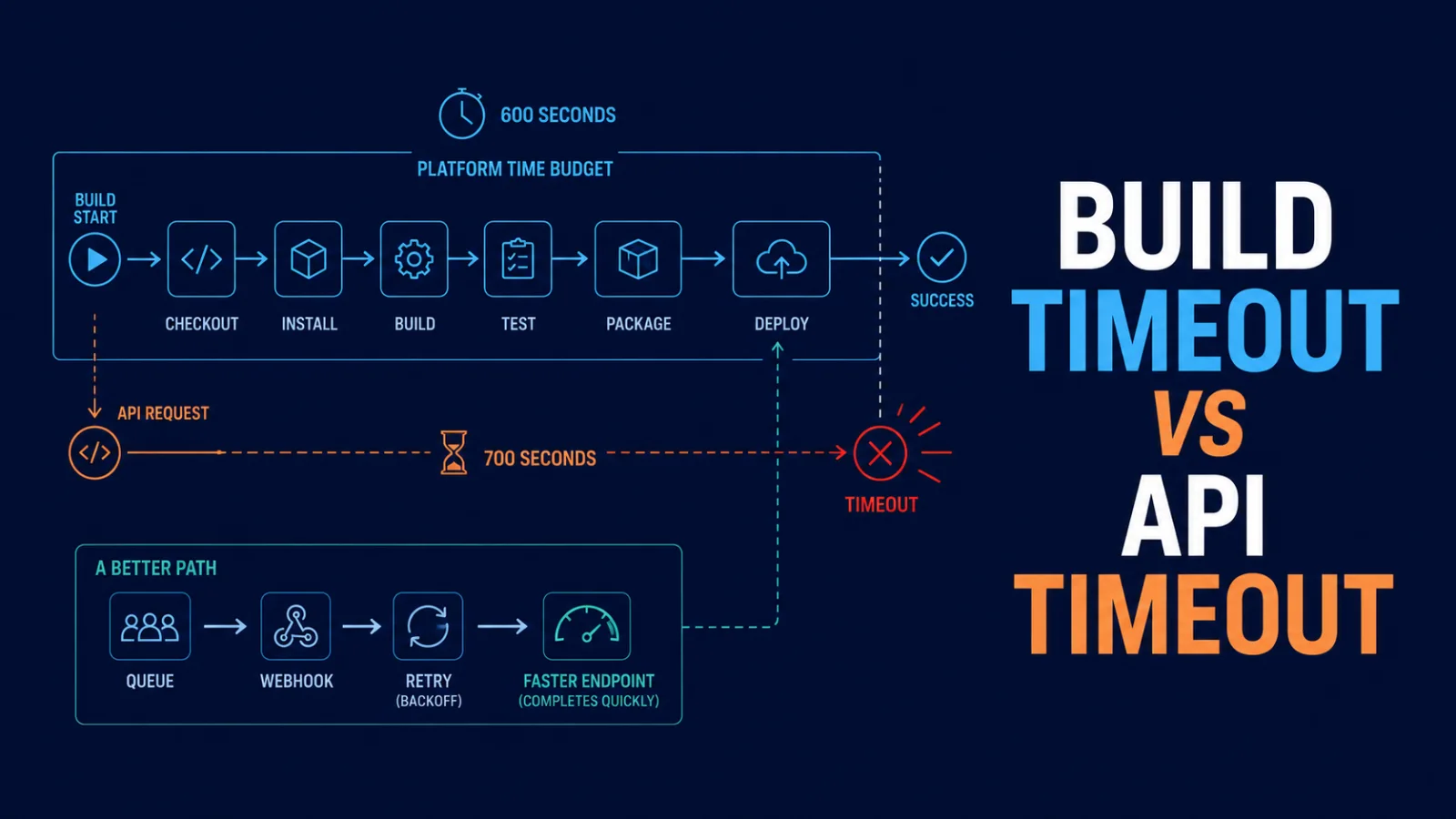
Build Timeout vs. API Timeout: Why a 700-Second Fetch Cannot Finish in a 600-Second Build
A 700-second API request cannot reliably complete inside a 600-second build. Learn how to find the real deadline, design timeout budgets, retry safely, and move long work out of the build path.

15 JavaScript Features Senior Developers Actually Use in 2026
Modern JavaScript is not about clever syntax. Learn 15 practical features and patterns senior developers use to write safer, clearer, and more maintainable applications in 2026.
Comments
0 commentsNo approved comments are visible yet. New community replies may wait for moderation.