15 JavaScript Features Senior Developers Actually Use in 2026

Modern JavaScript is not about clever syntax. Learn 15 practical features and patterns senior developers use to write safer, clearer, and more maintainable applications in 2026.
Knowing JavaScript syntax is not the same as writing JavaScript that a team can safely maintain. Senior-level code is usually easier to read, harder to misuse, and more explicit about failure, cancellation, data shape, and performance.
This guide covers modern JavaScript features that experienced developers reach for in real applications. The goal is not to use clever syntax everywhere. The goal is to choose language features that reduce ambiguity and make the next engineer's job easier.
1. Optional chaining and nullish coalescing
Optional chaining (?.) safely stops property access when a value is null or undefined. Nullish coalescing (??) supplies a default only for those two missing values.
function getCustomerLabel(order) {
  const name = order.customer?.profile?.displayName ?? 'Guest';
  const points = order.customer?.loyaltyPoints ?? 0;

  return `${name} (${points} points)`;
}
This is safer than using || when 0, false, or an empty string is a valid value.
const retries = settings.retries || 3;  // 0 becomes 3
const safeRetries = settings.retries ?? 3; // 0 remains 0
Senior habit: use ?. at uncertain boundaries such as API responses, but do not use it to hide data that your own application guarantees. Unexpected missing state may deserve an error.
2. Destructuring with clear defaults
Destructuring documents the data a function expects and keeps default values near the function boundary.
function createAccount({
  email,
  role = 'member',
  notifications = true,
  metadata = {},
}) {
  if (!email) throw new Error('email is required');

  return { email, role, notifications, metadata };
}
You can also rename unclear API fields while destructuring:
const { created_at: createdAt, user_id: userId } = apiResponse;
Senior habit: destructure only the fields you need. A function with fifteen destructured arguments probably needs a smaller responsibility or a validated configuration object.
3. Async/await with intentional error boundaries
async and await make asynchronous workflows read from top to bottom, but senior code also decides where an error should be handled.
async function loadDashboard(userId) {
  try {
    const response = await fetch(`/api/users/${userId}/dashboard`);

    if (!response.ok) {
      throw new Error(`Dashboard request failed: ${response.status}`);
    }

    return await response.json();
  } catch (error) {
    console.error('Unable to load dashboard', { userId, error });
    throw error;
  }
}
Avoid catching an error only to return undefined. That converts a clear failure into a confusing error later.
4. Promise.all for independent work
Sequential await calls are correct when one result depends on another. Independent operations should often run concurrently.
async function loadProfilePage(userId) {
  const [profile, projects, notifications] = await Promise.all([
    fetchProfile(userId),
    fetchProjects(userId),
    fetchNotifications(userId),
  ]);

  return { profile, projects, notifications };
}
Use Promise.allSettled() when every result matters even if one operation fails, such as a batch import.
Senior habit: concurrency is not unlimited parallelism. For thousands of tasks, use a queue or concurrency limiter instead of creating thousands of promises at once.
5. AbortController for cancellation
Applications waste resources when obsolete requests keep running. AbortController gives fetch and other compatible APIs a standard cancellation signal.
const controller = new AbortController();

async function searchProducts(query) {
  const response = await fetch(
    `/api/products?q=${encodeURIComponent(query)}`,
    { signal: controller.signal },
  );

  return response.json();
}

// Cancel when the user starts a newer search or leaves the page.
controller.abort();
Senior habit: treat cancellation differently from a real failure so expected aborts do not pollute error monitoring.
6. Object and array spread without accidental mutation
Spread syntax is useful for small immutable updates.
const nextUser = {
  ...user,
  preferences: {
    ...user.preferences,
    theme: 'dark',
  },
};
Remember that spread performs a shallow copy. Nested objects still share references unless you copy them too.
const clone = { ...original };
clone.settings.theme = 'dark'; // May also change original.settings.theme
Use structuredClone() when you truly need a supported deep clone of structured data.
const independentCopy = structuredClone(original);
It handles many built-in data types, but it does not clone functions or DOM nodes.
7. Map and Set for the correct data model
Use Set for unique values and Map when keys are dynamic or are not limited to strings.
const uniqueTags = [...new Set(['js', 'api', 'js', 'testing'])];

const requestsByUser = new Map();
requestsByUser.set(userObject, { count: 3, lastSeenAt: Date.now() });
For counting string values, Map avoids collisions with inherited object properties.
function countWords(words) {
  const counts = new Map();

  for (const word of words) {
    const key = word.toLowerCase();
    counts.set(key, (counts.get(key) ?? 0) + 1);
  }

  return counts;
}
8. Array methods that communicate intent
Choose the method that describes the operation:
map()transforms every item.filter()keeps matching items.find()returns the first match.some()asks whether any item matches.every()asks whether all items match.reduce()combines items when the accumulator is genuinely clear.
const activeEmails = users
  .filter((user) => user.isActive)
  .map((user) => user.email);
Do not force every loop into reduce(). A straightforward for...of loop is often more readable for multi-step logic, early exits, or asynchronous work.
9. Object.groupBy for readable grouping
In runtimes that support it, Object.groupBy() replaces repetitive grouping reducers.
const tickets = [
  { id: 1, status: 'open' },
  { id: 2, status: 'closed' },
  { id: 3, status: 'open' },
];

const ticketsByStatus = Object.groupBy(
  tickets,
  (ticket) => ticket.status,
);
Check your supported browsers and Node.js version before adopting newer features. A senior decision includes the deployment environment, not only language elegance.
10. Private class fields
Private fields use # and are enforced by the language rather than by naming convention.
class RateLimiter {
  #requests = 0;
  #limit;

  constructor(limit) {
    this.#limit = limit;
  }

  tryConsume() {
    if (this.#requests >= this.#limit) return false;
    this.#requests += 1;
    return true;
  }
}
Private fields protect invariants, but classes should still remain focused. Privacy does not fix a class that owns too many responsibilities.
11. Modules and dynamic import
ES modules create explicit dependencies with import and export. Dynamic import() loads code only when it is needed.
async function openChart(data) {
  const { renderChart } = await import('./chart.js');
  return renderChart(data);
}
This can reduce initial bundle size for heavy editors, charts, administration tools, or rarely used routes.
Senior habit: split code around user workflows, not around every tiny component. Too many small chunks add network and caching overhead.
12. Intl for dates, numbers, currencies, and lists
Manual formatting creates localization bugs. The Intl APIs are built for locale-aware output.
const money = new Intl.NumberFormat('en-US', {
  style: 'currency',
  currency: 'USD',
}).format(1299.5);

const date = new Intl.DateTimeFormat('en-GB', {
  dateStyle: 'medium',
}).format(new Date());
const languages = new Intl.ListFormat('en', {
  style: 'long',
  type: 'conjunction',
}).format(['JavaScript', 'TypeScript', 'Rust']);
This is more reliable than concatenating commas, currency symbols, or date fragments yourself.
13. URL and URLSearchParams instead of string concatenation
Use the platform's URL tools to encode parameters correctly.
const url = new URL('/api/articles', window.location.origin);
url.searchParams.set('language', 'en');
url.searchParams.set('query', 'async JavaScript');
url.searchParams.set('page', '2');

fetch(url);
This avoids broken URLs when values contain spaces, ampersands, Unicode characters, or reserved symbols.
14. Custom errors with useful context
Typed application errors let callers distinguish validation, authorization, network, and domain failures.
class ValidationError extends Error {
  constructor(message, details = {}) {
    super(message);
    this.name = 'ValidationError';
    this.details = details;
  }
}

function registerUser(input) {
  if (!input.email?.includes('@')) {
    throw new ValidationError('Invalid email address', {
      field: 'email',
    });
  }
}
Do not place secrets, tokens, passwords, or sensitive personal data inside error messages or logs.
15. Closures for controlled state
Closures let a function retain access to its surrounding variables without exposing those values globally.
function createIdGenerator(prefix = 'item') {
  let current = 0;

  return function nextId() {
    current += 1;
    return `${prefix}-${current}`;
  };
}

const nextOrderId = createIdGenerator('order');
console.log(nextOrderId()); // order-1
console.log(nextOrderId()); // order-2
Closures power callbacks, factories, memoization, and module patterns. They can also retain large objects longer than expected, so avoid capturing unnecessary data in long-lived listeners.
A practical senior-level example
The following service combines validation, URL handling, cancellation, explicit HTTP errors, and structured return values.
class HttpError extends Error {
  constructor(status, message) {
    super(message);
    this.name = 'HttpError';
    this.status = status;
  }
}

async function findUsers({ query, page = 1, signal } = {}) {
  const normalizedQuery = query?.trim();

  if (!normalizedQuery) {
    throw new ValidationError('A search query is required', {
      field: 'query',
    });
  }

  const url = new URL('/api/users', window.location.origin);
  url.searchParams.set('q', normalizedQuery);
  url.searchParams.set('page', String(page));

  const response = await fetch(url, { signal });

  if (!response.ok) {
    throw new HttpError(
      response.status,
      `User search failed with status ${response.status}`,
    );
  }

  const payload = await response.json();

  return {
    users: payload.data ?? [],
    total: payload.meta?.total ?? 0,
    nextPage: payload.meta?.nextPage ?? null,
  };
}
The senior-level part is not the number of modern features. It is the set of decisions: validate early, encode URLs safely, support cancellation, reject failed HTTP responses, avoid leaking uncertain API shapes, and return a predictable result.
Common mistakes to avoid
- Using optional chaining everywhere and silently hiding invalid state.
- Replacing every loop with a dense chain of array methods.
- Running dependent requests inside
Promise.all(). - Launching unlimited concurrent promises for large datasets.
- Assuming object spread creates a deep copy.
- Catching errors without logging, translating, recovering, or rethrowing.
- Using a new feature without checking the project's supported runtimes.
- Adding abstractions before the code has a real repeated problem.
Final takeaway
Senior JavaScript is not about showing how many language features you know. It is about making behavior obvious, preserving valid values, modeling data with the right structure, handling failure deliberately, and respecting runtime constraints.
Start with the features that remove the most ambiguity from your current codebase. Use optional chaining and ?? carefully, make async boundaries explicit, cancel obsolete work, select the correct collection, and rely on platform APIs for URLs and localization. The result will be code that is easier to review, test, operate, and change.
Further reading
Featured Articles

YOLO Object Detection: A Complete Practical Guide for Developers
A developer-focused, end-to-end guide to YOLO object detection covering core concepts, datasets, training, evaluation, real-time inference, deployment, optimization, production risks, and interviews.
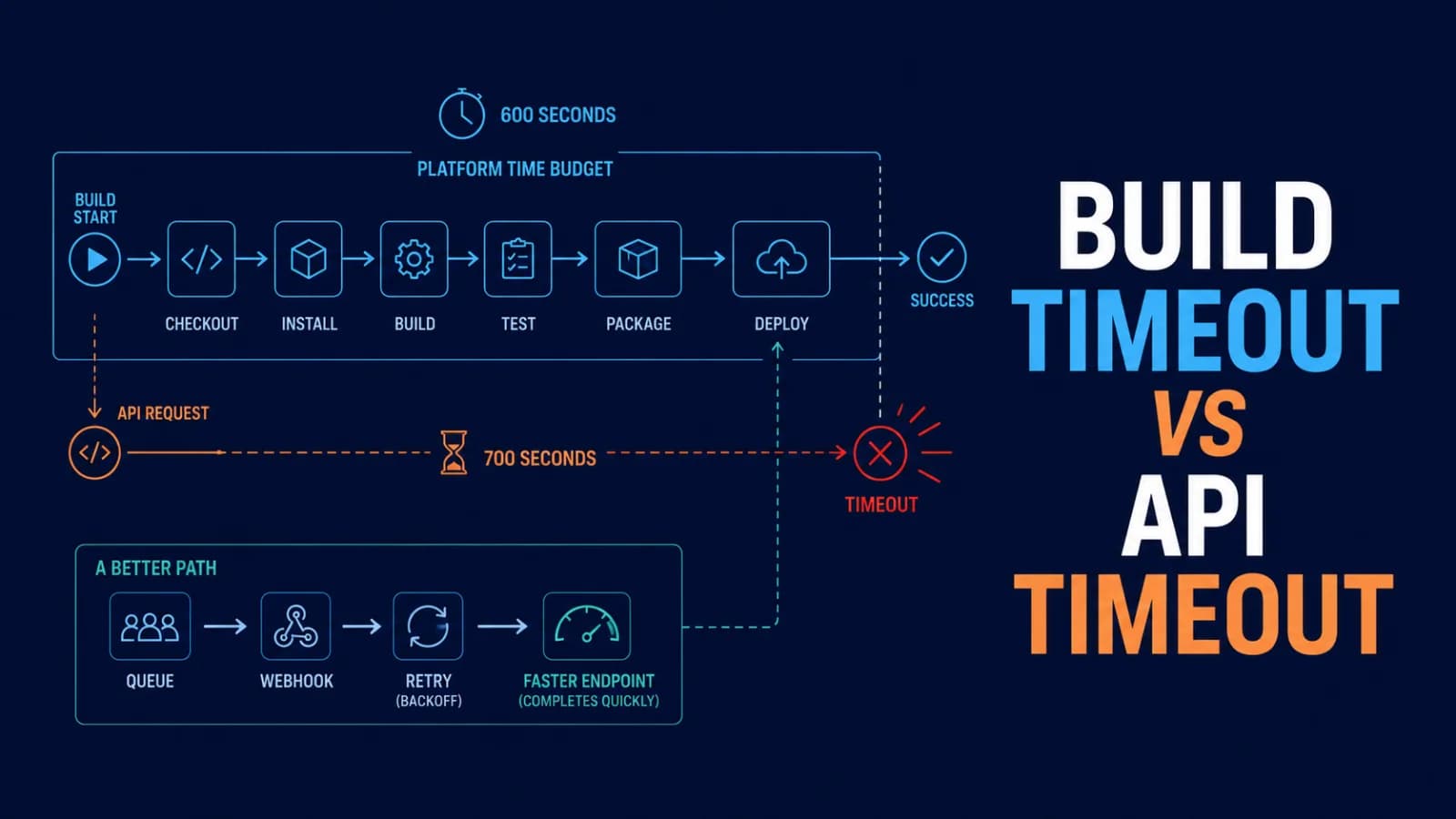
Build Timeout vs. API Timeout: Why a 700-Second Fetch Cannot Finish in a 600-Second Build
A 700-second API request cannot reliably complete inside a 600-second build. Learn how to find the real deadline, design timeout budgets, retry safely, and move long work out of the build path.

What Are Stellar’s Soroban Smart Contracts? A Practical Developer and Interview Guide
Understand Stellar smart contracts, Soroban’s Rust SDK, storage, authorization, fees, testing, deployment, security, and interview questions.
Comments
0 commentsNo approved comments are visible yet. New community replies may wait for moderation.