Build Timeout vs. API Timeout: Why a 700-Second Fetch Cannot Finish in a 600-Second Build
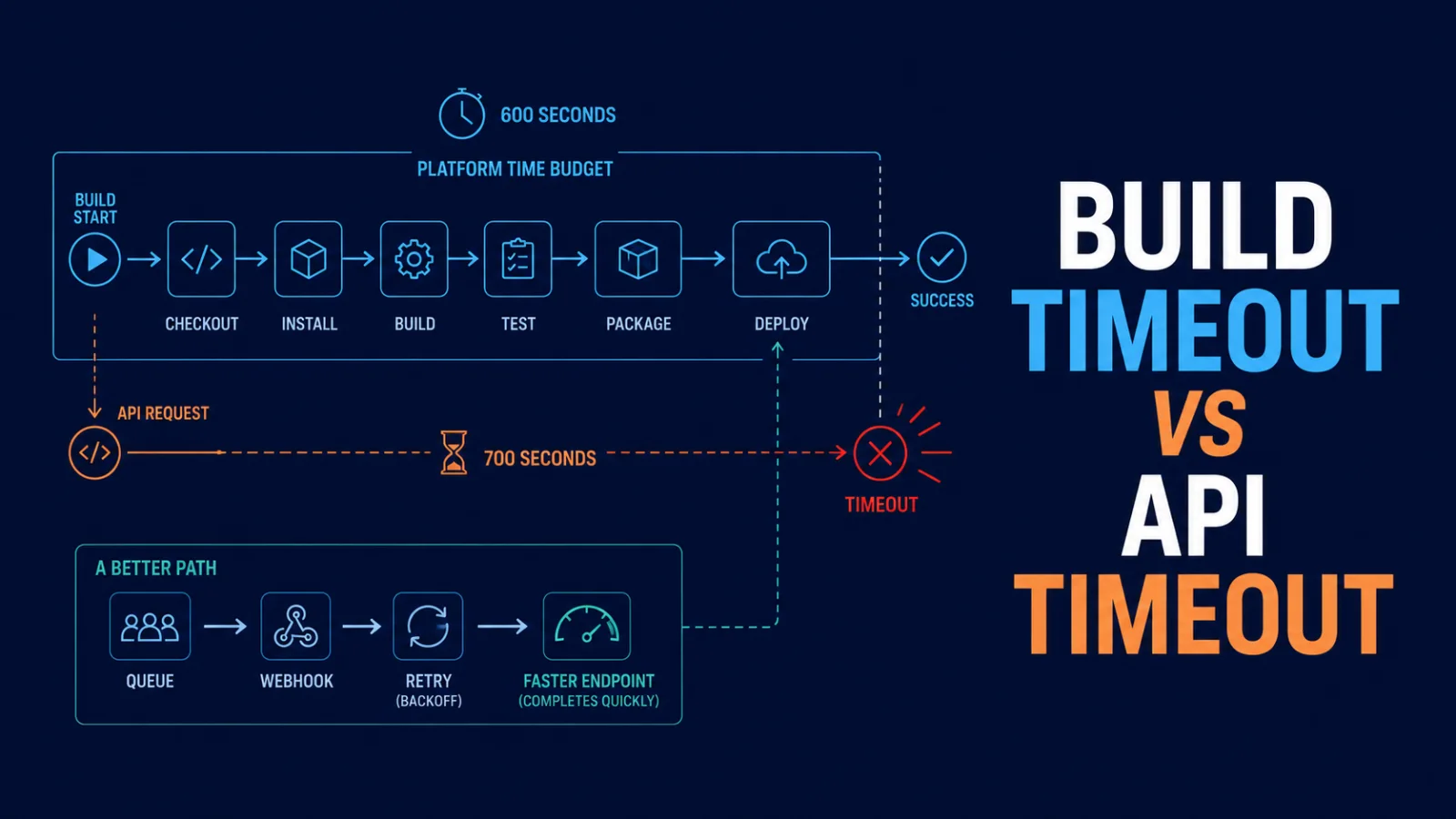
A 700-second API request cannot reliably complete inside a 600-second build. Learn how to find the real deadline, design timeout budgets, retry safely, and move long work out of the build path.
A slow request is not the real problem
One deployment looked harmless: the build fetched data from an API, transformed it, and produced static pages. The request was allowed to run for 700 seconds. The platform stopped the build after 600 seconds.
That is not a flaky deployment. It is a deadline mismatch. A request that needs 700 seconds cannot reliably finish inside a 600-second environment—and the request is not even the only work the build must do.
This article shows how to diagnose that mismatch, set useful timeout budgets, retry without making failures slower, and remove long-running work from the deployment path.
The earliest deadline wins
Most production requests have more than one timer:
| Layer | Example deadline |
|---|---|
| Hosting platform build limit | 600 seconds |
| CI job limit | 15 minutes |
| Framework data-fetch timeout | 60 seconds |
| HTTP client timeout | 700 seconds |
| Upstream API or proxy limit | 30 seconds |
The smallest applicable deadline decides the outcome. Setting an HTTP client to 700 seconds does not extend a platform that terminates the process at 600. It can make the logs more confusing because the client is still willing to wait after the outer system has already given up.
There is another catch: a build has overhead. Dependency installation, compilation, image processing, writing files, and uploading artifacts all consume the same overall budget. Treat the platform maximum as a hard ceiling, not time available for one API call.
Start with a build timeline
Before changing a timeout, collect a timeline for one failed deployment:
- when the build began and when the fetch started;
- DNS, connection, and time-to-first-byte timing when available;
- the upstream request ID, HTTP status, and response size;
- whether the request was retried; and
- which component emitted the final timeout message.
Use a correlation ID that reaches the API, but never print authorization headers, tokens, or full sensitive payloads. The goal is to identify the first deadline that expires, not simply the last error that appears in the log.
Give every operation a budget
Do not use the full build allowance as a request timeout. Reserve time for the rest of the deployment and give each operation a deliberately smaller budget.
For example, a build capped at 600 seconds might reserve 120 seconds for install and output upload, 60 seconds for an emergency cleanup path, and only 20 seconds for one external API call. The exact numbers differ by project; the principle does not: nested work must fit inside its parent deadline with room to recover.
Modern runtimes can cancel a fetch with AbortSignal.timeout():
async function fetchJson(url, { timeoutMs = 15_000, ...options } = {}) {
  const response = await fetch(url, {
    ...options,
    signal: AbortSignal.timeout(timeoutMs),
  });

  if (!response.ok) {
    throw new Error(`Request failed with ${response.status}`);
  }

  return response.json();
}
If a caller already owns a cancellation signal, combine it with the timeout signal rather than replacing it:
const signal = AbortSignal.any([
  callerSignal,
  AbortSignal.timeout(timeoutMs),
]);
Feature support depends on the runtime you deploy to, so confirm the version used by your build environment and provide a compatible cancellation helper where necessary.
Retries need a deadline too
Retries are useful for temporary network errors, throttling, and some server failures. They are harmful when they turn one doomed request into three doomed requests. Retry only idempotent work, only failures that can reasonably recover, and only while there is enough time left.
const sleep = (ms) => new Promise((resolve) => setTimeout(resolve, ms));

async function fetchWithRetry(url, { attempts = 3, deadlineMs = 20_000 } = {}) {
  const startedAt = Date.now();

  for (let attempt = 0; attempt < attempts; attempt += 1) {
    const remaining = deadlineMs - (Date.now() - startedAt);
    if (remaining <= 0) throw new Error("Request budget exhausted");

    try {
      return await fetchJson(url, { timeoutMs: Math.min(8_000, remaining) });
    } catch (error) {
      const lastAttempt = attempt === attempts - 1;
      if (lastAttempt) throw error;

      const backoff = 400 * 2 ** attempt + Math.random() * 250;
      await sleep(Math.min(backoff, Math.max(0, remaining)));
    }
  }
}
In a real application, also inspect response status: a 429 may require respecting Retry-After; most 4xx responses should not be retried; and a non-idempotent POST needs an idempotency key or a different workflow.
Fix the architecture, not just the number
Once an API call is longer than the deployment window, raising a client timeout is no longer a solution. Choose a path that removes the long work from the critical path.
Make the data cheaper to fetch
Request only the fields the build needs. Add server-side pagination, indexes, a purpose-built export endpoint, compression, or a precomputed aggregate. A cache close to the build can turn a large upstream query into a fast read.
Build from a snapshot
For content that can be a few minutes old, create a snapshot before deployment and build from it. Publish the last known good snapshot if a refresh fails, then alert the team. This keeps a transient upstream problem from blocking every release.
Move long work into a job
If the API is generating a report, crawling pages, or processing thousands of records, start a background job. Store its result, signal completion with a webhook or status endpoint, and let the deployment consume completed data. A deployment should orchestrate small, predictable steps—not wait for an unbounded task.
Fetch at runtime when freshness matters
Static generation is not always the right place to obtain changing data. Depending on the framework, use incremental regeneration, stale-while-revalidate caching, or server rendering so a slow upstream call affects a bounded request path rather than the whole release.
Parallelism helps only with limits
Independent calls should not be serialized unnecessarily, but unlimited Promise.all() can overload the API and create its own timeout storm. Use a small concurrency limit, preserve a global deadline, and measure the upstream capacity before increasing it.
When a higher timeout is reasonable
Increasing a timeout can be valid when the task is known, bounded, rare, and every outer layer allows it. It is not a good answer when the platform has a fixed lower cap, the endpoint is routinely slow, or the request is on a user-facing path.
| Situation | Better response |
|---|---|
| A one-off migration with a controlled runner | Raise the runner budget and monitor it |
| A slow external data source during every build | Cache or build from a snapshot |
| A report that takes minutes to produce | Start an asynchronous job |
| A user request waiting on a slow API | Return a job status or cached response |
| A platform with a strict maximum | Redesign so work completes before the cap |
A deployment-friendly checklist
- Find the earliest timeout across platform, runner, proxy, client, and upstream.
- Reserve build time for work after the fetch.
- Set an explicit, smaller timeout for each external call.
- Bound retries with backoff, jitter, idempotency, and a total deadline.
- Cache or snapshot slow build inputs.
- Move long-running generation and processing to background jobs.
- Log timings, status, and request IDs without leaking secrets.
- Test the failure path: slow response,
429,5xx, and an unreachable host.
The takeaway
A 700-second fetch in a 600-second environment is a design signal, not a tuning problem. Let the outer deadline guide the design: make data faster, accept a cached snapshot, or run the slow work elsewhere. Once every layer has a realistic budget, deployments become predictable again.
Further reading
Featured Articles

YOLO Object Detection: A Complete Practical Guide for Developers
A developer-focused, end-to-end guide to YOLO object detection covering core concepts, datasets, training, evaluation, real-time inference, deployment, optimization, production risks, and interviews.

15 JavaScript Features Senior Developers Actually Use in 2026
Modern JavaScript is not about clever syntax. Learn 15 practical features and patterns senior developers use to write safer, clearer, and more maintainable applications in 2026.

What Are Stellar’s Soroban Smart Contracts? A Practical Developer and Interview Guide
Understand Stellar smart contracts, Soroban’s Rust SDK, storage, authorization, fees, testing, deployment, security, and interview questions.
Comments
0 commentsNo approved comments are visible yet. New community replies may wait for moderation.