YOLO Object Detection: A Complete Practical Guide for Developers
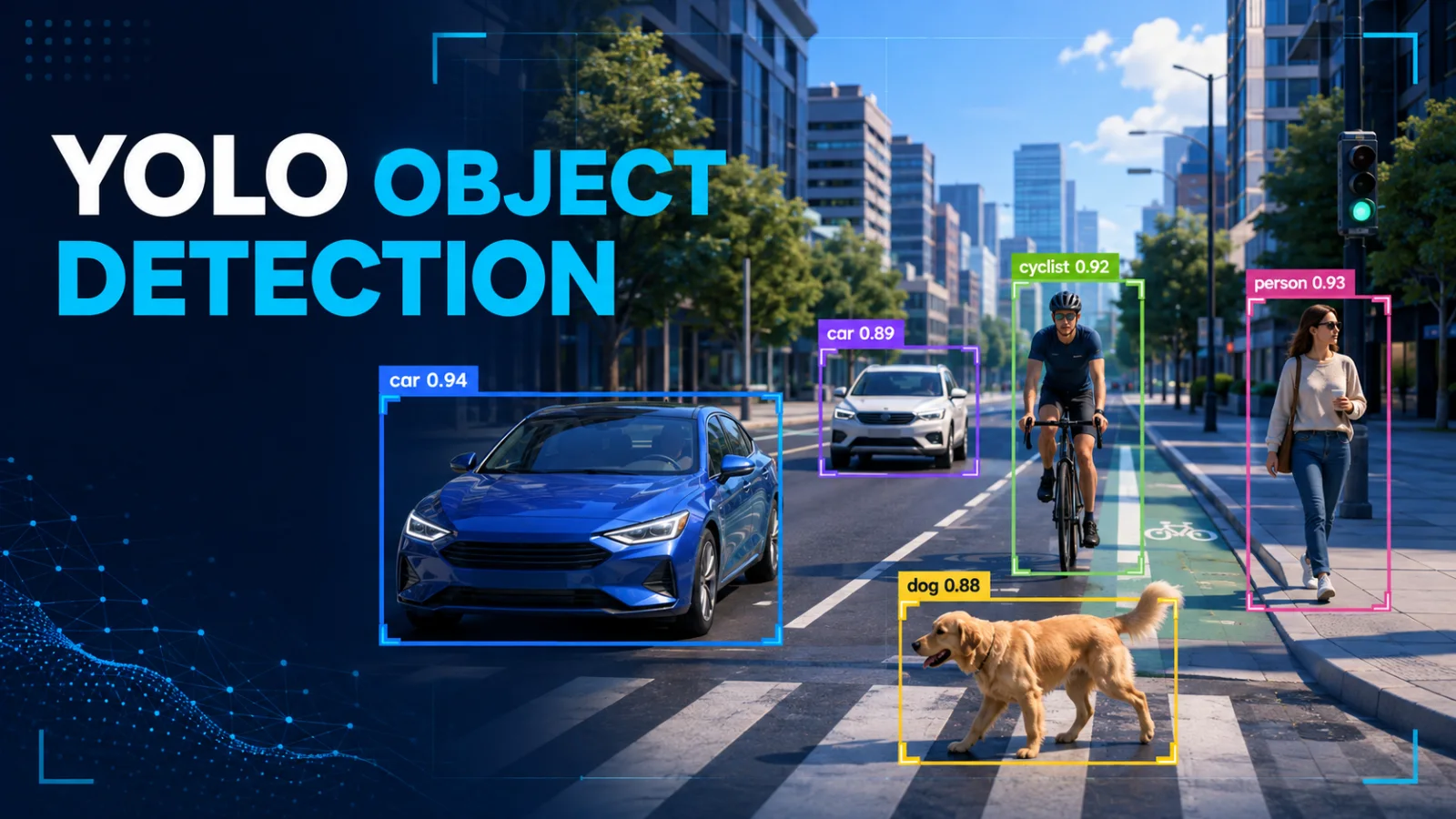
A developer-focused, end-to-end guide to YOLO object detection covering core concepts, datasets, training, evaluation, real-time inference, deployment, optimization, production risks, and interviews.
What YOLO object detection is
YOLO—“You Only Look Once”—is a family of single-stage object detectors designed to locate and classify multiple objects in one pass through a neural network. Unlike image classification, which assigns one label to an entire image, object detection returns a set of predictions: a class, confidence score, and bounding box for every detected object.
A detection is commonly represented as ((x, y, w, h, p, c)), where (x,y) describe the box center, (w,h) its size, (p) the object confidence, and (c) the predicted class. Modern implementations often return corner coordinates ((x_1,y_1,x_2,y_2)) after post-processing.
Why YOLO is popular
YOLO balances accuracy, latency, model size, and deployment flexibility. It powers traffic monitoring, manufacturing inspection, retail analytics, sports analysis, robotics, agriculture, document processing, and assistive applications. Its advantage is end-to-end efficiency: one model predicts locations and classes together.
YOLO is not one frozen algorithm. It is an evolving family. Exact layers, losses, label assignment, and export support depend on the implementation and checkpoint. Always read the documentation for the version you use.
Essential vocabulary
Bounding box
A rectangle surrounding an object. Labels may use pixels or normalized values.
Confidence
An estimate of prediction reliability. A threshold removes weak candidates.
IoU
Intersection over Union measures overlap: [ IoU = rac{ ext{intersection area}}{ ext{union area}} ]
Precision and recall
[ Precision = rac{TP}{TP+FP}, quad Recall = rac{TP}{TP+FN} ] Increasing the confidence threshold usually raises precision but may lower recall.
mAP
Mean Average Precision summarizes accuracy across classes and recall levels. mAP@0.50 uses one IoU threshold; mAP@0.50:0.95 is stricter.
How the pipeline works
- Decode an image or video frame.
- Resize and normalize it.
- Run the neural network.
- Decode predictions into boxes, classes, and scores.
- remove weak and duplicate detections.
- Scale coordinates to the original image.
A typical model contains a backbone for feature extraction, a neck for multi-scale feature fusion, and a head that predicts detections.
Single-stage versus two-stage detection
Two-stage detectors generate candidate regions and then classify/refine them. Single-stage detectors predict directly over feature maps. Two-stage designs can suit maximum-accuracy tasks; YOLO-style detectors are often preferred for real-time and edge systems. Benchmark on your own data.
Installation
python -m venv .venv
source .venv/bin/activate        # Linux/macOS
# .venv\Scripts\Activate.ps1   # Windows PowerShell
python -m pip install --upgrade pip
pip install ultralytics opencv-python
Pin tested versions for production. GPU use requires compatible PyTorch, drivers, and CUDA.
First image inference
from ultralytics import YOLO

model = YOLO("yolo11n.pt")
results = model.predict(source="street.jpg", conf=0.35, imgsz=640, save=True)

for result in results:
    for box in result.boxes:
        class_id = int(box.cls.item())
        x1, y1, x2, y2 = box.xyxy[0].tolist()
        print({
            "class": model.names[class_id],
            "confidence": round(float(box.conf.item()), 3),
            "box": [round(x1), round(y1), round(x2), round(y2)],
        })
Start with a small model for a latency baseline. Increase size only when measured accuracy gains justify the cost.
Real-time webcam detection
import cv2
from ultralytics import YOLO

model = YOLO("yolo11n.pt")
camera = cv2.VideoCapture(0)
if not camera.isOpened():
    raise RuntimeError("Could not open camera")

while True:
    ok, frame = camera.read()
    if not ok:
        break
    result = model.predict(frame, conf=0.4, verbose=False)[0]
    cv2.imshow("YOLO detection", result.plot())
    if cv2.waitKey(1) & 0xFF == ord("q"):
        break

camera.release()
cv2.destroyAllWindows()
For streams, separate capture, inference, and output with bounded queues. Dropping stale frames is better than allowing unlimited backlog.
Dataset structure and labels
Each YOLO label line commonly contains:
class_id x_center y_center width height
Coordinates are normalized. Recommended structure:
dataset/
├── images/{train,val,test}/
└── labels/{train,val,test}/
path: /absolute/path/to/dataset
train: images/train
val: images/val
test: images/test
names:
  0: person
  1: helmet
  2: safety_vest
Split by real-world source, not only random images. Adjacent video frames are duplicates; splitting them across train and validation sets creates misleading scores.
Label quality checklist
- Define rules for partial and occluded objects.
- Keep boxes tight and consistent.
- Label every relevant instance.
- Define treatment of reflections, posters, and screens.
- Review class balance and object sizes.
- Audit samples from every annotator.
- Version the dataset and guidelines.
Missing labels are harmful because correct predictions can be treated as false positives.
Training a custom detector
from ultralytics import YOLO

model = YOLO("yolo11n.pt")
model.train(
    data="dataset.yaml",
    epochs=100,
    imgsz=640,
    batch=16,
    device=0,
    workers=8,
    project="runs/safety",
    name="baseline",
)
Pretrained weights usually converge faster than training from scratch. More epochs cannot fix bad labels, leakage, or missing production scenarios.
Evaluation and error analysis
from ultralytics import YOLO

model = YOLO("runs/safety/baseline/weights/best.pt")
metrics = model.val(data="dataset.yaml", split="test")
print("mAP50:", metrics.box.map50)
print("mAP50-95:", metrics.box.map)
Do not stop at one mAP number. Slice results by class, object size, camera, customer, lighting, weather, occlusion, motion blur, distance, and compression. Build an error gallery of false positives, false negatives, localization errors, and duplicates.
Thresholds and NMS
Low confidence thresholds improve recall but add false alarms. High thresholds produce cleaner output but miss difficult objects. Tune according to business cost.
Non-Maximum Suppression removes overlapping duplicate boxes. Aggressive NMS may merge nearby objects; permissive NMS leaves duplicates. Crowded scenes need deliberate tests.
Complete batch-processing example
from pathlib import Path
import json
from ultralytics import YOLO

model = YOLO("yolo11n.pt")
records = []

for path in sorted(Path("input").glob("*")):
    if path.suffix.lower() not in {".jpg", ".jpeg", ".png", ".webp"}:
        continue
    result = model.predict(str(path), conf=0.35, imgsz=640, verbose=False)[0]
    detections = []
    for box in result.boxes:
        class_id = int(box.cls.item())
        detections.append({
            "class_id": class_id,
            "class_name": model.names[class_id],
            "confidence": round(float(box.conf.item()), 4),
            "xyxy": [round(v, 2) for v in box.xyxy[0].tolist()],
        })
    records.append({"image": path.name, "detections": detections})

Path("detections.json").write_text(json.dumps(records, indent=2), encoding="utf-8")
Add structured logging, validation, resource limits, model warm-up, and operational metrics in production.
Serving with FastAPI
from fastapi import FastAPI, File, HTTPException, UploadFile
import cv2, numpy as np
from ultralytics import YOLO

app = FastAPI()
model = YOLO("runs/safety/baseline/weights/best.pt")

@app.post("/detect")
async def detect(file: UploadFile = File(...)):
    raw = await file.read()
    if len(raw) > 10 * 1024 * 1024:
        raise HTTPException(413, "File too large")
    image = cv2.imdecode(np.frombuffer(raw, np.uint8), cv2.IMREAD_COLOR)
    if image is None:
        raise HTTPException(400, "Invalid image")
    result = model.predict(image, conf=0.35, verbose=False)[0]
    return {"detections": [{
        "class": model.names[int(b.cls.item())],
        "confidence": float(b.conf.item()),
        "xyxy": b.xyxy[0].tolist(),
    } for b in result.boxes]}
Install fastapi uvicorn python-multipart. In real services, load and warm the model during application startup.
Performance optimization
Measure full latency: decode, preprocessing, transfer, inference, NMS, rendering, serialization, and network time.
- Warm models before traffic.
- Use FP16 on supported GPUs.
- Batch offline work carefully.
- Avoid unnecessary image copies.
- Bound concurrency and queue depth.
- Validate ONNX, TensorRT, OpenVINO, or Core ML exports.
- Benchmark p50, p95, and p99 latency.
- Monitor utilization, memory, errors, and dropped frames.
Compare exported output class by class; faster does not automatically mean equivalent.
Production architecture
A resilient service separates API/authentication, upload validation, object storage, asynchronous queues, inference workers, results, monitoring, and audit logs. Use synchronous inference only when immediate output is required. Long videos are safer as background jobs with progress updates.
Security and privacy
Images may expose faces, plates, screens, addresses, and private spaces. Apply data minimization, retention limits, access control, and encryption. Validate decoded content rather than extensions. Limit pixel dimensions to prevent decompression bombs. Never load untrusted model files.
Detections are probabilistic. Do not make a detector the sole authority for high-stakes medical, legal, employment, or safety decisions.
Ten common mistakes
- Duplicate-frame leakage across splits.
- Inconsistent annotation rules.
- Trusting global mAP while a critical class fails.
- Testing only clean images.
- Using one threshold for all classes.
- Ignoring p95 and p99 latency.
- Allowing unbounded video queues.
- Exporting without regression tests.
- Logging private raw images by default.
- Ignoring drift after cameras or environments change.
Production checklist
- Version model, data, code, configuration, and label map.
- Preserve preprocessing and post-processing contracts.
- Maintain an untouched representative test set.
- Define accuracy and latency gates.
- Use canary or shadow evaluation.
- Track per-class precision, recall, and volume.
- Sample failures for human review.
- Support rollback.
- Document formats, limits, and retention.
Interview questions
Why is YOLO single-stage?
It predicts locations and classes directly rather than using a separate region-proposal stage.
What does IoU measure?
Predicted/reference overlap divided by their combined area.
Precision or recall?
It depends on error cost. Safety screening may prioritize recall; automated blocking may demand high precision.
Why can validation look unrealistically good?
Duplicates or samples from the same video/camera leak across splits.
What is NMS?
Post-processing that removes redundant overlapping detections.
How do you improve small-object detection?
Improve representative high-resolution data and labels, tune image size and augmentations, preserve multi-scale features, and test tiling when appropriate.
How do you deploy safely?
Version everything, validate exports, bound queues, protect private data, monitor performance, canary releases, and support rollback.
Final perspective
A YOLO project is a data-and-systems project, not merely a training command. Start with a measurable baseline, build trustworthy labels, analyze errors by scenario, and optimize only after profiling the full pipeline. A small, well-tested detector in a reliable service is often more valuable than a larger model with impressive laboratory metrics and weak production controls.
References
- Ultralytics documentation: https://docs.ultralytics.com/
- Original YOLO paper: https://arxiv.org/abs/1506.02640
- COCO dataset and evaluation: https://cocodataset.org/
- ONNX documentation: https://onnx.ai/
Featured Articles
Kafka in Production: Partition Strategy, Consumer Lag, Reliability, and an Incident Playbook
A production Kafka cluster needs more than brokers. Learn to choose partition keys, plan retention and capacity, monitor lag, handle rebalances, and rehearse failure recovery.

Laravel and Kafka Without Lost Events: The Transactional Outbox, Idempotent Consumers, and PostgreSQL
A database commit and a Kafka publish cannot safely be treated as one ordinary transaction. This guide builds an outbox and consumer design that survives crashes and duplicate delivery.

Apache Kafka Explained: Topics, Partitions, Consumer Groups, and Your First Event Pipeline
Follow one order event from producer to consumers, then run a local Kafka topic and learn what partitions, offsets, keys, and consumer groups actually do.
Comments
0 commentsNo approved comments are visible yet. New community replies may wait for moderation.