Serverless Architecture
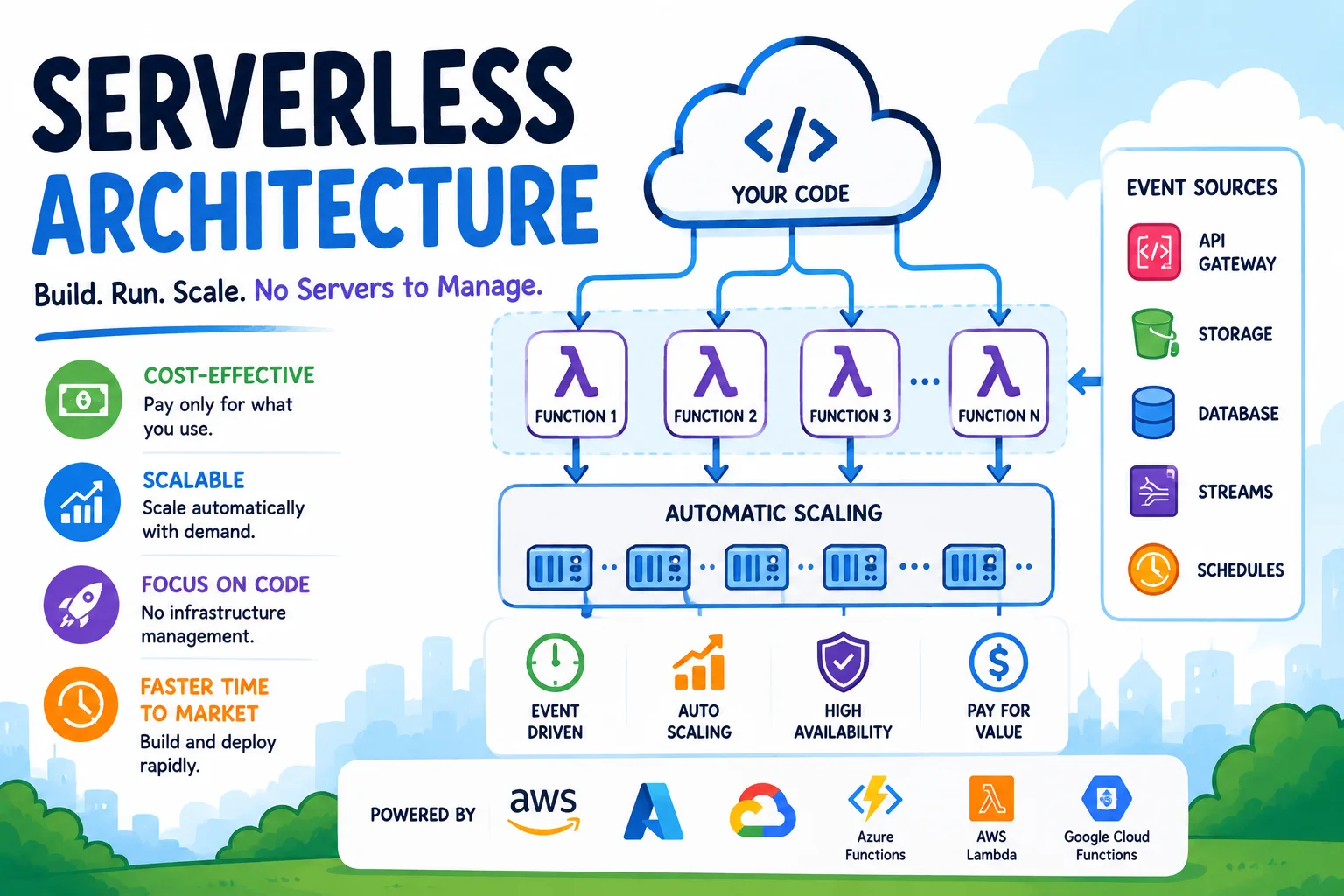
Serverless computing allows developers to build and run applications without managing servers. The cloud provider handles all infrastructure — provisioning, scaling, patching, and maintenance. Developers write functions, configure triggers, and the platform takes care of the rest.
Introduction
Serverless computing allows developers to build and run applications without managing servers. The cloud provider handles all infrastructure — provisioning, scaling, patching, and maintenance. Developers write functions, configure triggers, and the platform takes care of the rest.
The name "serverless" is misleading — servers are still involved. But the developer never thinks about them. This shift from infrastructure management to pure application logic is transforming how applications are built and deployed.
How Serverless Works
The Execution Model
                     ┌─────────────────────┐
                     │   Event Source      │
                     │ (HTTP, Queue, Timer,│
                     │  Storage, etc.)     │
                     └──────────┬──────────┘
                                │ Trigger
                                ▼
┌──────────────────────────────────────────────────┐
│              Serverless Function                 │
│  ┌────────────────────────────────────────────┐  │
│  │   1. Cold Start (if needed)               │  │
│  │      - Provision sandbox                  │  │
│  │      - Initialize runtime (Node, Python)  │  │
│  │      - Load dependencies                  │  │
│  ├────────────────────────────────────────────┤  │
│  │   2. Execute handler function              │  │
│  │   3. Return response                       │  │
│  └────────────────────────────────────────────┘  │
│              Auto-scales horizontally             │
│              from 0 to N concurrent executions    │
└──────────────────────────────────────────────────┘
Simple Serverless Function
// AWS Lambda handler
exports.handler = async (event) => {
  const { name } = JSON.parse(event.body);

  const response = {
    statusCode: 200,
    headers: { 'Content-Type': 'application/json' },
    body: JSON.stringify({
      message: `Hello, ${name}!`,
      timestamp: new Date().toISOString()
    })
  };

  return response;
};
Serverless vs. Traditional Architecture
| Aspect | Traditional (servers) | Serverless |
|---|---|---|
| Server management | Required (patching, updates) | None |
| Scaling | Manual or auto-scaling groups | Automatic, from 0 to 1000s |
| Billing | Per-hour/instance (idle cost) | Per-execution + per-memory (no idle cost) |
| Cold starts | N/A (always on) | 100ms-1s for initial invocation |
| Max execution | Unlimited | Timeout (15 min Lambda, 10 min Cloud Functions) |
| State | Persistent (in-memory state) | Stateless by design |
| Deployment | Full server or container | Single function |
| Granularity | Monolith or service | Single function |
Serverless Event Sources
Common Triggers
| Event Source | Provider | Use Case |
|---|---|---|
| HTTP (API Gateway) | AWS, Azure, GCP | REST APIs, webhooks |
| Database Change (CDC) | DynamoDB Streams, CosmosDB Change Feed, Firestore | Sync data, trigger workflows |
| File Upload | S3, Blob Storage, Cloud Storage | Image processing, file validation |
| Message Queue | SQS, Queue Storage, Pub/Sub | Decoupled async processing |
| Stream | Kinesis, Event Hubs, Pub/Sub | Real-time data processing |
| Schedule | CloudWatch Events, Timer, Scheduler | Cron jobs, batch processing |
| SES, SendGrid | Email processing | |
| IoT | IoT Core, Event Grid | Device telemetry processing |
Multi-Event Function
# AWS SAM template — Function triggered by multiple events
AWSTemplateFormatVersion: '2010-09-09'
Transform: AWS::Serverless-2016-10-31

Resources:
  OrderProcessor:
    Type: AWS::Serverless::Function
    Properties:
      CodeUri: src/
      Handler: orders.handler
      Runtime: nodejs20.x
      Events:
        HttpPost:
          Type: Api
          Properties:
            Path: /orders
            Method: POST
        QueueConsumer:
          Type: SQS
          Properties:
            Queue: !GetAtt OrderQueue.Arn
            BatchSize: 10
        StreamProcessor:
          Type: DynamoDB
          Properties:
            Stream: !GetAtt OrdersTable.StreamArn
            StartingPosition: TRIM_HORIZON
Building a Serverless Application
Example: Image Processing Pipeline
                  ┌──────────┐
                  │ User     │
                  │ Uploads  │
                  └────┬─────┘
                       ▼
              ┌─────────────────┐
              │  S3 Bucket      │
              │  (upload/raw)   │
              └────────┬────────┘
                       │ trigger
                       ▼
              ┌─────────────────┐
              │  Lambda         │
              │  (process.ts)   │
              │                 │
              │   1. Read image │
              │   2. Resize     │
              │   3. Compress   │
              │   4. Extract    │
              │      metadata   │
              └────────┬────────┘
                       │
               ┌───────┴───────┐
               ▼               ▼
        ┌────────────┐  ┌──────────────┐
        │ S3 Bucket  │  │ DynamoDB    │
        │ (processed)│  │ (metadata)  │
        └────────────┘  └──────────────┘
// process.ts — Image processing Lambda
import { S3 } from '@aws-sdk/client-s3';
import { DynamoDB } from '@aws-sdk/client-dynamodb';
import sharp from 'sharp';

const s3 = new S3();
const dynamo = new DynamoDB();

const SUPPORTED_FORMATS = ['image/jpeg', 'image/png', 'image/webp'];

export const handler = async (event: S3Event) => {
  const results = await Promise.allSettled(
    event.Records.map(async (record) => {
      const bucket = record.s3.bucket.name;
      const key = decodeURIComponent(record.s3.object.key.replace(/\+/g, ' '));

      // Validate file type
      const headResult = await s3.headObject({ Bucket: bucket, Key: key });
      if (!SUPPORTED_FORMATS.includes(headResult.ContentType!)) {
        console.log(`Unsupported format: ${headResult.ContentType}`);
        return;
      }

      // Read original
      const { Body } = await s3.getObject({ Bucket: bucket, Key: key });
      const buffer = await Body!.transformToByteArray();

      // Process: resize to multiple sizes
      const sizes = [
        { suffix: 'thumbnail', width: 150, height: 150 },
        { suffix: 'medium', width: 800, height: 600 },
        { suffix: 'large', width: 1920, height: 1080 },
      ];

      for (const size of sizes) {
        const processed = await sharp(buffer)
          .resize(size.width, size.height, { fit: 'cover' })
          .webp({ quality: 80 })
          .toBuffer();

        const outputKey = key.replace('raw', `processed/${size.suffix}`);
        await s3.putObject({
          Bucket: bucket.replace('-raw', '-processed'),
          Key: outputKey,
          Body: processed,
          ContentType: 'image/webp',
        });
      }

      // Store metadata
      await dynamo.putItem({
        TableName: 'ImageMetadata',
        Item: {
          imageId: { S: key },
          originalSize: { N: buffer.byteLength.toString() },
          formats: { SS: ['thumbnail', 'medium', 'large'] },
          uploadedAt: { S: new Date().toISOString() },
        },
      });
    })
  );

  const failed = results.filter(r => r.status === 'rejected');
  if (failed.length > 0) {
    throw new Error(`${failed.length} images failed processing`);
  }

  return { processed: results.length - failed.length, failed: failed.length };
};
Cold Starts and Mitigation
What Causes Cold Starts?
When a function is idle, the platform reclaims its resources. The next invocation requires:
- Provision runtime (~50ms — Node.js, Python; ~500ms — Java, C#)
- Initialize dependencies (~50-500ms depending on package size)
- Execute handler code (~10-50ms outside the handler)
Total cold start: 100ms to 2s depending on runtime and package size.
Cold Start Times by Runtime
| Runtime | Cold Start (median) | Cold Start (p99) |
|---|---|---|
| Python | 200ms | 500ms |
| Node.js | 250ms | 600ms |
| Go | 100ms | 300ms |
| .NET | 500ms | 2s |
| Java | 800ms | 3s |
| Rust | 100ms | 250ms |
Mitigation Strategies
| Strategy | How It Works | Cost Impact |
|---|---|---|
| Provisioned Concurrency (Lambda) | Keep N instances always warm | Pay for warm instances |
| SnapStart (Lambda) | Pre-initialize and snapshot runtime | Minimal extra cost |
| Keep-warm pings | Periodic invocations every 5 minutes | Negligible |
| Lighter runtime | Use Node.js/Python/Go instead of Java | No extra cost |
| Minimize dependencies | Smaller deployment packages | No extra cost |
Serverless Costs
Pricing Model
Most serverless platforms charge based on:
- Requests — Number of function invocations.
- Duration — Execution time (rounded to nearest 1ms or 100ms).
- Memory — Configured memory per invocation.
Cost Comparison Example
Scenario: API handling 1M requests/month, 200ms avg execution, 512MB memory

Traditional (t3.small, $0.0208/hr):
  $0.0208 × 730 hours = $15.18/month (always on)

Serverless (Lambda):
  Requests: 1M × $0.20/1M = $0.20
  Duration: 1M × 0.2s × 512MB/1024MB × $0.0000166667/GB-s = $1.67
  Total: $1.87/month

Savings: ~87% at low traffic

Breakeven point: At ~45M requests/month, traditional becomes cheaper
Cost Optimization
# Serverless cost optimization checklist
cost_optimization:
  - "Right-size memory: 128MB may be sufficient, but 1769MB costs 14x more"
  - "Use AWS Compute Optimizer for memory recommendations"
  - "Minimize function duration (optimize code, use async where possible)"
  - "Use reserved concurrency only when needed"
  - "Delete unused functions and resources"
  - "Use Lambda SnapStart for Java/.NET to reduce duration"
  - "Leverage Lambda@Edge or CloudFront Functions for edge processing"
Serverless Ecosystem
Compute
| Service | Provider | Key Feature |
|---|---|---|
| AWS Lambda | AWS | Largest ecosystem, 15 min timeout |
| Azure Functions | Microsoft | Deep Office 365 / Teams integration |
| Cloud Functions | Python-first, eventarc integration | |
| Cloudflare Workers | Cloudflare | Edge-based, <1ms cold starts, 30MB scripts |
Databases
| Service | Type | Serverless Feature |
|---|---|---|
| DynamoDB | Key-value + Document | On-demand capacity, auto-scaling |
| Aurora Serverless | Relational (MySQL/PostgreSQL) | Auto-scaling compute capacity |
| Cosmos DB | Multi-model | Serverless throughput mode |
| Firestore | Document | Auto-scaling, real-time sync |
| Neon | Serverless PostgreSQL | Branching, auto-suspend |
Storage
| Service | Use Case |
|---|---|
| S3 / Blob / Cloud Storage | File storage, event triggers |
| ElastiCache Serverless | In-memory caching |
| SQS / Queue Storage | Message queuing |
| EventBridge / Event Grid | Event bus |
Design Patterns
1. Fan-Out Pattern
Process multiple items in parallel:
SQS Queue → Lambda → SNS Topic → Lambda (email)
                                 → Lambda (SMS)
                                 → Lambda (push)
                                 → Lambda (logging)
2. Saga Pattern (Distributed Transactions)
// Order saga with compensation
async function createOrder(event) {
  const { orderId, userId, items, total } = event;

  try {
    await reserveInventory(items);
    await processPayment(userId, total);
    await createShipment(orderId);
    await sendConfirmation(userId);

    return { status: 'completed', orderId };
  } catch (error) {
    // Compensating transactions (undo)
    await cancelShipment(orderId);
    await refundPayment(userId, total);
    await releaseInventory(items);

    throw error;
  }
}
3. Throttle Queue Pattern
Handle traffic spikes by buffering requests:
API Gateway → SQS (buffer) → Lambda (process)
                              ↑
                     Process at your own pace
4. Event Sourcing Pattern
// Store events, derive current state
interface OrderEvent {
  type: 'CREATED' | 'ITEM_ADDED' | 'PAID' | 'SHIPPED' | 'CANCELLED';
  orderId: string;
  timestamp: string;
  data: Record<string, any>;
}

// Function: store event
exports.recordEvent = async (event: OrderEvent) => {
  await dynamo.putItem({
    TableName: 'OrderEvents',
    Item: marshal(event)
  });
  // Don't modify order state directly
};

// Function: rebuild state from events
exports.getOrderState = async (orderId: string) => {
  const events = await queryEvents(orderId);
  return events.reduce((state, event) => applyEvent(state, event), initialState);
};
Serverless Monitoring and Observability
Structured Logging
// Structured logging for serverless
const logger = {
  info: (message: string, context?: object) => {
    console.log(JSON.stringify({
      timestamp: new Date().toISOString(),
      level: 'INFO',
      message,
      aws_request_id: context.awsRequestId,
      function_name: context.functionName,
      ...context
    }));
  },
  error: (message: string, error?: Error) => {
    console.error(JSON.stringify({
      timestamp: new Date().toISOString(),
      level: 'ERROR',
      message,
      error_name: error?.name,
      error_message: error?.message,
      stack: error?.stack,
    }));
  }
};
Distributed Tracing
// X-Ray tracing
import { AWS } from '@aws-sdk/client-lambda';
import { captureAWS } from 'aws-xray-sdk-core';

const lambda = captureAWS(new AWS.Lambda());

exports.handler = async (event) => {
  const segment = new Segment('process_order');
  // ... function logic with automatic subsegment tracking
};
Dashboards
Key metrics to monitor:
- Invocations count and error rate.
- Duration (p50, p95, p99).
- Throttles (exceeded concurrency limits).
- Cold start rate.
- Cost per function.
When NOT to Use Serverless
| Scenario | Why Serverless Is Not Ideal | Alternative |
|---|---|---|
| Long-running processes (>15 min) | Execution timeout | Containers, VMs |
| Stateful applications | Stateless by design | Stateful services (WebSocket API, Redis) |
| Constant high traffic (>100 req/s sustained) | Costs exceed provisioned capacity | Auto-scaling containers |
| Low-latency requirements (<10ms) | Cold start overhead | Provisioned concurrency, edge functions |
| Complex orchestration | Function composition is hard | Step Functions, workflows |
| Platform-specific features | Limited runtime capabilities | Full OS access (containers) |
Conclusion
Serverless architecture is ideal for:
- Event-driven workloads — File processing, webhooks, notifications.
- Variable traffic patterns — APIs with unpredictable load.
- Rapid prototyping — No infrastructure to set up.
- Background processing — Queues, streams, scheduled tasks.
- Microservice components — Isolate specific functionality.
Start with serverless for:
- A new API endpoint.
- An image processing pipeline.
- A scheduled data aggregation job.
- A webhook receiver.
Migrate to containers when:
- Traffic becomes steady and high-volume.
- Execution duration consistently exceeds limits.
- You need specific OS-level capabilities.
- Cost analysis shows containers are cheaper.
Serverless is not the answer to everything — but for the right workloads, it dramatically reduces operational overhead and development time.
Featured Articles

The 10 Largest Frontend Performance Challenges in 2026 (And How to Fix Them)

Should I Use React or Next.js? Complete Comparison Guide 2026

Build an Offline-First SaaS with Laravel & React: Complete PWA Tutorial 2026
Comments
0 commentsNo approved comments are visible yet. New community replies may wait for moderation.