MLOps: Machine Learning Operations
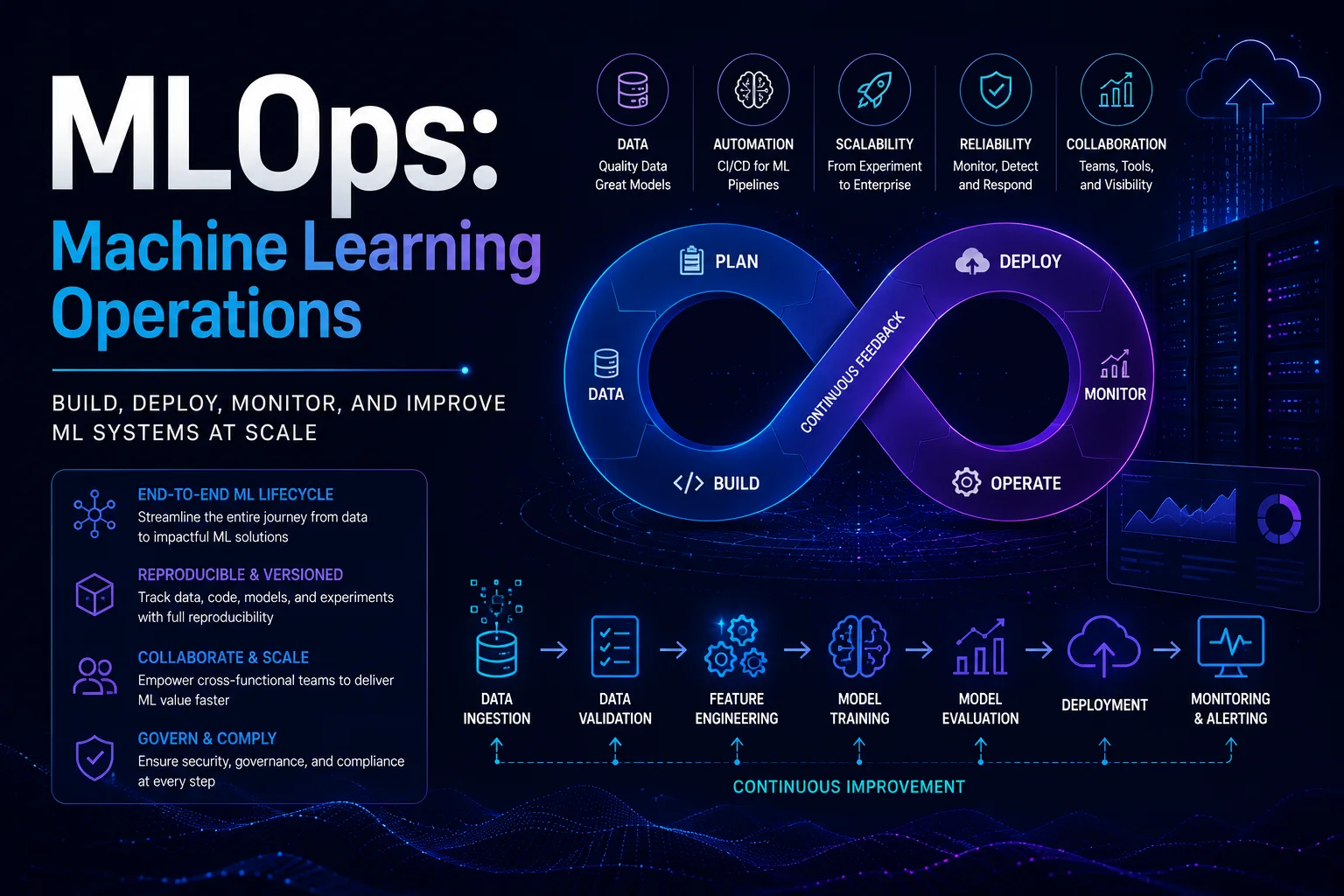
MLOps (Machine Learning Operations) is a set of practices that combines machine learning, DevOps, and data engineering to deploy and maintain ML models in production reliably and efficiently. Just as DevOps transformed software delivery, MLOps transforms ML from a research activity into a reliable production discipline.
Introduction
MLOps (Machine Learning Operations) is a set of practices that combines machine learning, DevOps, and data engineering to deploy and maintain ML models in production reliably and efficiently. Just as DevOps transformed software delivery, MLOps transforms ML from a research activity into a reliable production discipline.
The core challenge MLOps addresses: ML systems have unique failure modes that traditional software does not. Models degrade over time (data drift, concept drift). Training pipelines are non-deterministic. Models can fail silently — outputting predictions that look reasonable but are increasingly wrong.
Why MLOps Matters
Common ML Production Failures
| Problem | Impact | Root Cause |
|---|---|---|
| Data drift | Model accuracy drops from 95% to 70% | Underlying data distribution changed |
| Concept drift | Model makes wrong predictions | Relationship between features and labels changed |
| Training-serving skew | Model works in training, fails in production | Training data != production data |
| Reproducibility failure | Cannot recreate model results | Missing code, data, or environment versioning |
| Silent failures | Model returns predictions but they are low quality | No monitoring, no alerts |
| Infrastructure drift | Pipeline breaks after library updates | Dependency version mismatch |
The MLOps Lifecycle
                 ┌─────────────┐
                 │ Data        │
                 │ Management  │
                 └──────┬──────┘
                        │
                 ┌──────▼──────┐
                 │ Experiment  │
                 │ & Training  │
                 └──────┬──────┘
                        │
              ┌─────────▼─────────┐
              │ Model Evaluation  │
              │ & Validation      │
              └─────────┬─────────┘
                        │
              ┌─────────▼─────────┐
              │ Model Deployment  │
              │ & Serving         │
              └─────────┬─────────┘
                        │
              ┌─────────▼─────────┐
              │ Monitoring &      │
              │ Alerting          │
              └─────────┬─────────┘
                        │
              ┌─────────▼─────────┐
              │ Retrain & Repeat  │
              └───────────────────┘
1. Data Management
Feature Store
A feature store is a centralized repository for storing, sharing, and serving ML features:
# Feast feature definition
from datetime import timedelta
from feast import FeatureView, Entity, Field, FileSource
from feast.types import Float32, Int32, String

customer_entity = Entity(
    name='customer_id',
    value_type=Int32,
    description='Customer identifier for ML features'
)

# Batch features
customer_stats = FeatureView(
    name='customer_stats',
    entities=['customer_id'],
    ttl=timedelta(days=30),
    schema=[
        Field(name='total_orders', dtype=Int32),
        Field(name='avg_order_value', dtype=Float32),
        Field(name='days_since_last_order', dtype=Int32),
        Field(name='customer_tenure_days', dtype=Int32),
        Field(name='top_category', dtype=String),
    ],
    source=FileSource(path='s3://features/customer_stats.parquet'),
    online=True,  # Available for real-time serving
)

# Real-time features (computed on the fly)
class RealTimeFeatures:
    """Features computed in real-time from streaming data"""

    @on_demand_feature_view(
        sources=[customer_stats],
        schema=[
            Field(name='session_views_5min', dtype=Int32),
            Field(name='cart_value', dtype=Float32),
            Field(name='abandoned_cart', dtype=Int32),
        ]
    )
    def realtime_behavioral_features(inputs: pd.DataFrame) -> pd.DataFrame:
        return pd.DataFrame({
            'session_views_5min': get_recent_pageviews(inputs['customer_id']),
            'cart_value': get_current_cart_value(inputs['customer_id']),
            'abandoned_cart': check_abandoned_cart(inputs['customer_id']),
        })
Data Versioning
# DVC (Data Version Control)
dvc init
dvc add data/training_set.parquet
dvc run -n prepare_data \
  -d src/prepare.py \
  -d data/raw_orders.csv \
  -o data/training_set.parquet \
  python src/prepare.py

git add data/training_set.parquet.dvc
git commit -m "Add training dataset v1"
Data Validation
import great_expectations as ge

# Define expectations for training data
expectation_suite = {
    "expectations": [
        {
            "expectation_type": "expect_column_values_to_not_be_null",
            "kwargs": {"column": "customer_id"}
        },
        {
            "expectation_type": "expect_column_values_to_be_between",
            "kwargs": {
                "column": "age",
                "min_value": 18,
                "max_value": 120
            }
        },
        {
            "expectation_type": "expect_column_distinct_values_to_be_in_set",
            "kwargs": {
                "column": "country",
                "value_set": ["US", "UK", "CA", "DE", "FR"]
            }
        },
        {
            "expectation_type": "expect_column_mean_to_be_between",
            "kwargs": {
                "column": "order_amount",
                "min_value": 10,
                "max_value": 5000
            }
        },
        {
            "expectation_type": "expect_column_proportion_of_unique_values_to_be_between",
            "kwargs": {
                "column": "customer_id",
                "min_value": 0.5,
                "max_value": 1.0
            }
        }
    ]
}

# Validate
df = ge.read_parquet('s3://data-lake/curated/training_data.parquet')
results = df.validate(expectation_suite)
assert results['success'], "Data validation failed!"
2. Experiment Tracking
MLflow Example
import mlflow
from sklearn.ensemble import RandomForestClassifier
from sklearn.metrics import accuracy_score, precision_score, recall_score

# Set tracking URI
mlflow.set_tracking_uri('http://mlflow-server:5000')
mlflow.set_experiment('customer_churn_prediction')

with mlflow.start_run(run_name='rf_v2_balanced'):
    # Log parameters
    mlflow.log_param('model_type', 'RandomForest')
    mlflow.log_param('n_estimators', 200)
    mlflow.log_param('max_depth', 10)
    mlflow.log_param('class_weight', 'balanced')
    mlflow.log_param('features_used', ['age', 'tenure', 'total_orders', 'avg_order_value', 'support_tickets'])

    # Train model
    model = RandomForestClassifier(
        n_estimators=200,
        max_depth=10,
        class_weight='balanced',
        random_state=42
    )
    model.fit(X_train, y_train)

    # Evaluate
    y_pred = model.predict(X_test)
    metrics = {
        'accuracy': accuracy_score(y_test, y_pred),
        'precision': precision_score(y_test, y_pred),
        'recall': recall_score(y_test, y_pred),
        'f1': 2 * precision_score(y_test, y_pred) * recall_score(y_test, y_pred) /
              (precision_score(y_test, y_pred) + recall_score(y_test, y_pred))
    }

    # Log metrics
    for name, value in metrics.items():
        mlflow.log_metric(name, value)

    # Log model
    mlflow.sklearn.log_model(model, 'model')

    # Log artifacts
    mlflow.log_artifact('features_importance.png')
    mlflow.log_artifact('confusion_matrix.png')
    mlflow.log_artifact('data/training_set.parquet')

    # Register model
    mlflow.register_model('runs:/{}/model'.format(mlflow.active_run().info.run_id),
                          'churn_predictor')
Experiment Comparison
# Compare all runs in experiment
from mlflow.tracking import MlflowClient

client = MlflowClient()
runs = client.search_runs(
    experiment_ids=['1'],
    order_by=['metrics.f1 DESC'],
    max_results=10
)

for run in runs:
    print(f"Run: {run.info.run_id}")
    print(f"  F1: {run.data.metrics.get('f1'):.4f}")
    print(f"  Recall: {run.data.metrics.get('recall'):.4f}")
    print(f"  Params: {run.data.params}")
3. Model Training Pipeline
Automated Pipeline with Kubeflow
from kfp import dsl
from kfp.dsl import Input, Output, Dataset, Model

@dsl.component
def load_data(input_data: Input[Dataset]):
    import pandas as pd
    df = pd.read_parquet('s3://data-lake/features/*.parquet')
    df.to_csv(input_data.path, index=False)

@dsl.component
def train_model(
    training_data: Input[Dataset],
    model_output: Output[Model],
    n_estimators: int = 100,
    max_depth: int = 10,
):
    import pandas as pd
    from sklearn.ensemble import RandomForestClassifier
    import pickle

    df = pd.read_csv(training_data.path)
    X = df.drop('churned', axis=1)
    y = df['churned']

    model = RandomForestClassifier(
        n_estimators=n_estimators,
        max_depth=max_depth,
        random_state=42
    )
    model.fit(X, y)

    with open(model_output.path, 'wb') as f:
        pickle.dump(model, f)

@dsl.component
def evaluate_model(
    model: Input[Model],
    test_data: Input[Dataset],
):
    import pandas as pd
    import pickle
    from sklearn.metrics import f1_score

    with open(model.path, 'rb') as f:
        model_obj = pickle.load(f)

    df = pd.read_csv(test_data.path)
    X = df.drop('churned', axis=1) if 'churned' in df.columns else df
    y = df['churned'] if 'churned' in df.columns else None

    if y is not None:
        y_pred = model_obj.predict(X)
        f1 = f1_score(y, y_pred)
        print(f"F1 Score: {f1:.4f}")
        if f1 < 0.7:
            raise ValueError(f"Model F1 {f1:.4f} below threshold 0.7")

@dsl.pipeline
def churn_pipeline():
    data_task = load_data()
    train_task = train_model(
        training_data=data_task.outputs['input_data'],
        n_estimators=200,
        max_depth=10,
    )
    evaluate_task = evaluate_model(
        model=train_task.outputs['model_output'],
        test_data=data_task.outputs['input_data'],
    )
4. Model Evaluation and Validation
Evaluation Beyond Accuracy
import numpy as np
from sklearn.metrics import (
    confusion_matrix, classification_report,
    roc_auc_score, precision_recall_curve
)

def evaluate_model(model, X_test, y_test, model_name='Model'):
    y_pred = model.predict(X_test)
    y_proba = model.predict_proba(X_test)[:, 1] if hasattr(model, 'predict_proba') else None

    results = {
        'model': model_name,
        'accuracy': np.mean(y_pred == y_test),
        'auc_roc': roc_auc_score(y_test, y_proba) if y_proba is not None else None,
        'confusion_matrix': confusion_matrix(y_test, y_pred).tolist(),
        'classification_report': classification_report(y_test, y_pred, output_dict=True),
    }

    # Business metrics
    results['cost_savings'] = calculate_business_impact(y_test, y_pred)

    # Fairness metrics
    for sensitive_attr in ['gender', 'age_group', 'region']:
        results[f'fairness_{sensitive_attr}'] = check_fairness(
            model, X_test, y_test, sensitive_attr
        )

    return results

def check_fairness(model, X, y, sensitive_attr):
    """Check demographic parity and equal opportunity"""
    groups = X[sensitive_attr].unique()
    group_metrics = {}
    for group in groups:
        mask = X[sensitive_attr] == group
        y_pred = model.predict(X[mask])
        group_metrics[group] = {
            'positive_rate': np.mean(y_pred),
            'true_positive_rate': np.mean(y_pred[y[mask] == 1]) if sum(y[mask] == 1) > 0 else None,
        }
    return group_metrics
5. Model Deployment
Deployment Strategies
| Strategy | Description | Risk | Use Case |
|---|---|---|---|
| Shadow | New model runs in parallel, output logged but not used | None | Validation, logging comparison |
| Canary | Small % of traffic routed to new model | Low | Gradual rollout |
| Blue/Green | Two identical environments, swap instantly | Medium | Zero-downtime deployments |
| A/B Test | Split traffic, compare business metrics | Medium | Business validation |
Model Serving with KServe
apiVersion: serving.kserve.io/v1beta1
kind: InferenceService
metadata:
  name: churn-predictor
spec:
  predictor:
    model:
      modelFormat:
        name: sklearn
      storageUri: s3://models/churn-predictor/001
    minReplicas: 2
    maxReplicas: 10
    resources:
      requests:
        cpu: "1"
        memory: "2Gi"
      limits:
        cpu: "2"
        memory: "4Gi"
    autoscaler:
      target: 10  # Requests per second per replica
# Client code to call the deployed model
import requests

def predict_churn(customer_data: dict) -> float:
    payload = {
        'instances': [customer_data]
    }
    response = requests.post(
        'https://churn-predictor.example.com/v1/models/churn-predictor:predict',
        json=payload,
        headers={'Authorization': f'Bearer {API_TOKEN}'}
    )
    result = response.json()
    return result['predictions'][0]['score']
Model Optimization for Serving
# Convert model to ONNX for faster inference
import onnx
from skl2onnx import convert_sklearn
from skl2onnx.common.data_types import FloatTensorType

initial_type = [('float_input', FloatTensorType([None, X_train.shape[1]]))]
onnx_model = convert_sklearn(model, initial_types=initial_type)

with open('model.onnx', 'wb') as f:
    f.write(onnx_model.SerializeToString())

# ONNX Runtime is 2-5x faster than scikit-learn for inference
import onnxruntime as ort
session = ort.InferenceSession('model.onnx')
result = session.run(None, {'float_input': input_array.astype(np.float32)})
6. Monitoring
Model Monitoring Stack
monitoring_stack:
  metrics: Prometheus + Grafana
  logging: ELK Stack / Grafana Loki
  drift_detection: Evidently AI / WhyLabs
  alerts: PagerDuty / Slack

key_metrics:
  - prediction_count
  - latency_p50, p95, p99
  - error_rate
  - data_drift_score
  - model_drift_score
  - feature_distribution_stats
  - prediction_distribution
Data Drift Detection
# Evidently AI drift detection
from evidently import ColumnMapping
from evidently.report import Report
from evidently.metric_preset import DataDriftPreset, TargetDriftPreset

def detect_drift(reference_data, current_data, columns):
    report = Report(metrics=[
        DataDriftPreset(),
        TargetDriftPreset(),
    ])

    column_mapping = ColumnMapping(
        numerical_features=[c for c in columns if c != 'target'],
        target='target',
    )

    report.run(
        reference_data=reference_data,
        current_data=current_data,
        column_mapping=column_mapping,
    )

    result = report.as_dict()
    drift_detected = result['metrics'][0]['result']['dataset_drift']

    if drift_detected:
        alert_team(f"Data drift detected! Score: {result['metrics'][0]['result']['drift_score']:.2f}")

    return result
Performance Degradation Monitoring
class ModelMonitor:
    def __init__(self, model_id: str, expected_metrics: dict):
        self.model_id = model_id
        self.expected_metrics = expected_metrics
        self.predictions_buffer = []

    async def log_prediction(self, features: dict, prediction: float, actual: float = None):
        record = {
            'model_id': self.model_id,
            'timestamp': datetime.now().isoformat(),
            'features': features,
            'prediction': prediction,
            'actual': actual,
            'confidence': prediction if prediction > 0.5 else 1 - prediction,
        }
        self.predictions_buffer.append(record)

        # Periodically evaluate
        if len(self.predictions_buffer) >= 1000:
            await self.evaluate_performance()

    async def evaluate_performance(self):
        valid = [r for r in self.predictions_buffer if r['actual'] is not None]
        if len(valid) < 100:
            return

        accuracy = sum(1 for r in valid if (r['prediction'] > 0.5) == (r['actual'] == 1)) / len(valid)

        if accuracy < self.expected_metrics['accuracy'] - 0.05:
            await alert_team(
                f"Model {self.model_id} accuracy dropped from "
                f"{self.expected_metrics['accuracy']:.2f} to {accuracy:.2f}"
            )

        self.predictions_buffer = []
7. ML Pipeline with CI/CD
# .github/workflows/ml-pipeline.yml
name: ML Training Pipeline

on:
  schedule:
    - cron: '0 6 * * 1'  # Weekly: Monday 6 AM
  push:
    branches: [main]
    paths:
      - 'models/**'
      - 'features/**'
      - 'config/**'

jobs:
  train:
    runs-on: ubuntu-latest
    steps:
      - uses: actions/checkout@v4

      - name: Validate data
        run: python -m src.validate_data

      - name: Train model
        run: python -m src.train_model
        env:
          MLFLOW_TRACKING_URI: ${{ secrets.MLFLOW_URI }}

      - name: Evaluate model
        run: python -m src.evaluate

      - name: Deploy if champion
        run: |
          python -m src.promote_to_champion
          kubectl apply -f deployment.yaml
MLOps Maturity Levels
| Level | Data | Experiments | Pipelines | Deployment | Monitoring |
|---|---|---|---|---|---|
| 0 — Manual | Local files, no versioning | No tracking | Manual scripts | Copy model manually | None |
| 1 — Automated | Data versioning (DVC) | MLflow tracking | CI/CD training | Containerized serving | Basic metrics |
| 2 — Automated + Monitor | Feature store | Hyperparameter tuning | Orchestrated pipelines | A/B testing | Drift detection |
| 3 — Full MLOps | Automated data validation | AutoML | Self-healing pipelines | Auto-deploy | Automated retraining |
Conclusion
MLOps transforms ML from art to engineering. Key takeaways:
- Version everything — Data, code, models, and environments must be versioned for reproducibility.
- Automate pipelines — Training, evaluation, and deployment should be CI/CD-driven.
- Monitor continuously — Model degradation is silent. Track data drift, performance, and business metrics.
- Start simple, iterate — Level 0 → Level 1 → Level 2. Do not try to reach Level 3 overnight.
- ML is not just about models — A deployed model is a small part of a complex system.
The goal of MLOps is not to eliminate all failures — it is to detect and recover from them quickly. Invest in monitoring, alerting, and automated rollback capabilities before you need them.
Featured Articles

The 10 Largest Frontend Performance Challenges in 2026 (And How to Fix Them)

Should I Use React or Next.js? Complete Comparison Guide 2026

Build an Offline-First SaaS with Laravel & React: Complete PWA Tutorial 2026
Comments
0 commentsNo approved comments are visible yet. New community replies may wait for moderation.