Database Replication and High Availability
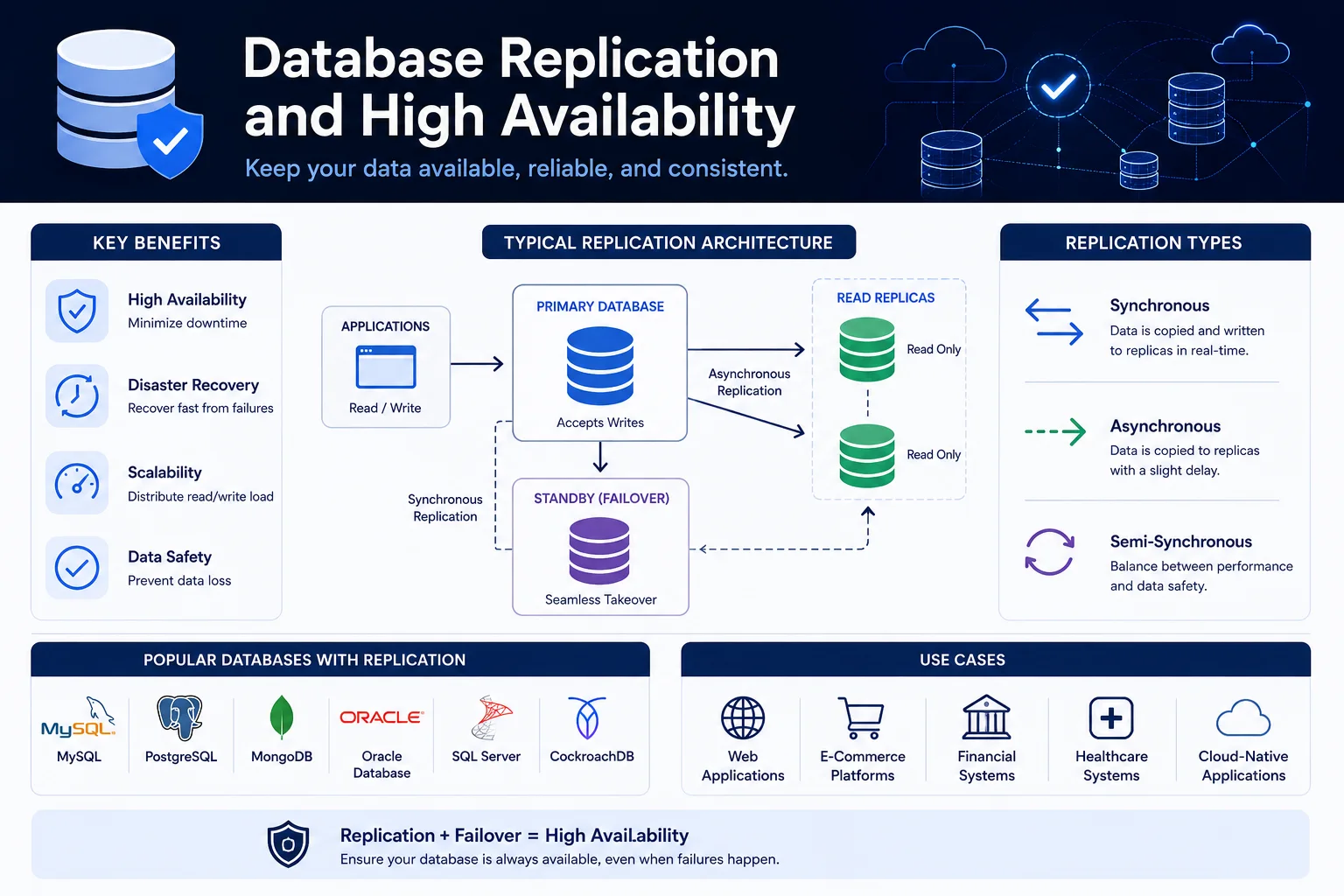
Database replication is the process of copying and maintaining database data across multiple servers. It is the foundation of high availability (HA), disaster recovery (DR), read scaling, and geographic distribution.
Introduction
Database replication is the process of copying and maintaining database data across multiple servers. It is the foundation of high availability (HA), disaster recovery (DR), read scaling, and geographic distribution.
No database is truly "always up" — hardware fails, networks partition, software crashes. Replication ensures that when one database instance fails, another can take over with minimal or no downtime.
Why Replication?
| Objective | Description | Replication Approach |
|---|---|---|
| High Availability | System remains accessible after failures | Automatic failover to replica |
| Disaster Recovery | Survive region-level outages | Geo-redundant replicas |
| Read Scaling | Handle more read queries | Distribute reads to replicas |
| Backup | Point-in-time recovery without load | Replica used for backups |
| Geographic Distribution | Low latency for global users | Local replicas in each region |
| Maintenance | Zero-downtime upgrades | Fail over during maintenance |
Replication Architectures
1. Single Leader (Master-Replica)
                    ┌──────────────────┐
                    │   Master Node    │
                    │  (reads + writes)│
                    └────────┬─────────┘
                             │ write-ahead log (WAL)
                             │
         ┌───────────────────┼───────────────────┐
         │                   │                   │
    ┌────▼────┐        ┌────▼────┐        ┌────▼────┐
    │Replica 1│        │Replica 2│        │Replica 3│
    │(read    │        │(read    │        │(read    │
    │ only)   │        │ only)   │        │ only)   │
    └─────────┘        └─────────┘        └─────────┘
Pros:
- Simple to set up and understand.
- Consistent reads from master.
- Well-supported by all databases.
Cons:
- Write bottleneck (single master).
- Replication lag (async) or write latency (sync).
- Manual or automated failover needed.
-- PostgreSQL streaming replication setup
-- Primary: postgresql.conf
wal_level = replica
max_wal_senders = 10
wal_keep_size = 1024  -- MB

-- Replica: postgresql.conf
primary_conninfo = 'host=primary.example.com port=5432 user=replicator'

-- Create replication slot on primary
SELECT pg_create_physical_replication_slot('replica_1');
2. Multi-Leader (Active-Active)
┌──────────────┐             ┌──────────────┐
│  Leader A    │◄───────────►│  Leader B    │
│  (US-East)   │  sync WAL   │  (EU-West)   │
└──────┬───────┘             └──────┬───────┘
       │                            │
  ┌────▼────┐                  ┌────▼────┐
  │Replica A│                  │Replica B│
  └─────────┘                  └─────────┘
Pros:
- Writes accepted in multiple locations (lower latency).
- No single point of failure for writes.
- Good for geographic distribution.
Cons:
- Write conflicts must be resolved (last-writer-wins, CRDTs, application logic).
- Complex conflict resolution.
- Not all databases support multi-leader.
# Multi-leader with conflict resolution (CouchDB, PostgreSQL BDR)
conflict_resolution:
  strategy: "last_writer_wins"  # Default — may lose data
  # or: "application_merge"     # Application handles conflicts
  # or: "crdt"                  # Automatic conflict-free merging
3. Leaderless (Quorum-Based)
Client ──► Write to all 3 nodes (W=2, R=2)

  ┌────────┐    ┌────────┐    ┌────────┐
  │ Node 1 │    │ Node 2 │    │ Node 3 │
  └────────┘    └────────┘    └────────┘
      │             │             │
      └─────────────┼─────────────┘
                    │
Client ◄────── Read from 2 nodes, compare versions (R=2)
Amazon DynamoDB / Cassandra model:
- Any node can accept reads or writes.
- W + R > N (total nodes) guarantees consistency.
- Uses vector clocks for version tracking.
Pros:
- No single point of failure.
- Extremely high availability.
- Linear scalability.
Cons:
- Eventual consistency by default.
- Complex conflict resolution (vector clocks).
- Not suitable for relational data with foreign keys.
Synchronous vs. Asynchronous Replication
| Aspect | Synchronous | Asynchronous |
|---|---|---|
| Data loss on failover | Zero (RPO = 0) | Some data loss (RPO > 0) |
| Write latency | Higher (wait for replica ACK) | Lower (acknowledge immediately) |
| Read-after-write consistency | Guaranteed | Possibly stale reads from replica |
| Network requirement | Low latency, reliable | Tolerates higher latency |
| Replica impact | Replica failure blocks writes | Replica failure has no impact |
-- PostgreSQL: synchronous replication
-- primary.conf
synchronous_standby_names = 'FIRST 1 (replica_1, replica_2)'

-- Now every write waits for at least one synchronous replica
-- Acknowledgment before returning COMMIT to client
Failover Strategies
Manual Failover
# PostgreSQL manual failover
# On replica:
pg_ctl promote -D /var/lib/postgresql/data

# Update application connection string
# point at new primary
Downtime: Minutes to hours (human response time).
Automatic Failover (HA Tools)
# Patroni — PostgreSQL HA
scope: production
namespace: /db/

consul:
  host: consul.example.com:8500

postgresql:
  use_pg_rewind: true
  parameters:
    max_connections: 200

# On primary failure:
# 1. Patroni detects primary is down
# 2. Promotes most up-to-date replica
# 3. Updates Consul with new primary address
# 4. All clients automatically reconnect
| Tool | Database | Mechanism | Failover Time |
|---|---|---|---|
| Patroni | PostgreSQL | Consul/etcd + REST API | 10-30 seconds |
| Orchestrator | MySQL | Raft-based | 5-15 seconds |
| Redis Sentinel | Redis | Gossip protocol | 10-30 seconds |
| MongoDB Replica Set | MongoDB | Internal election | < 10 seconds |
| Kubernetes Operator | Various | K8s-native | Depends on probe |
VIP / DNS Failover
# Keepalived — Virtual IP failover
vrrp_instance VI_1 {
    interface eth0
    state BACKUP
    virtual_router_id 51
    priority 100
    advert_int 1

    virtual_ipaddress {
        10.0.0.100/24  # Floating IP
    }

    track_script {
        chk_postgres
    }
}
Replication Lag and Consistency
Causes of Replication Lag
| Cause | Description | Mitigation |
|---|---|---|
| Network latency | Distance between nodes | Colocate or use WAN optimization |
| Large transactions | Slow to apply on replica | Break into smaller transactions |
| CPU saturation | Replica cannot keep up | Scale replica hardware |
| Long-running queries | Locks on replica | Set statement_timeout |
| DDL operations | Schema changes lock tables | Use concurrent DDL |
Monitoring Replication Lag
-- PostgreSQL lag monitoring
SELECT application_name,
       pg_size_pretty(pg_wal_lsn_diff(
           pg_current_wal_lsn(), replay_lsn
       )) as lag_bytes,
       ROUND(EXTRACT(EPOCH FROM NOW() - pg_last_xact_replay_timestamp()))
       as lag_seconds
FROM pg_stat_replication;

-- Expected: < 1 second (async), < 10ms (sync)
Handling Stale Reads
# Application pattern: "read-your-writes" consistency
class ConsistentDBClient:
    def __init__(self, master, replica):
        self.master = master
        self.replica = replica

    def write(self, key, value):
        # Write to master, record timestamp
        result = self.master.execute("INSERT ...")
        self._last_write_timestamp = time.time()
        return result

    def read(self, key):
        # Read from replica, but verify freshness
        data = self.replica.execute(f"SELECT * FROM ... WHERE id='{key}'")

        # Check if we just wrote this record
        stale_time = time.time() - self._last_write_timestamp
        if stale_time < 1.0:  # Within last second
            # This is a recent write — read from master for consistency
            if data is None:
                data = self.master.execute(f"SELECT ... WHERE id='{key}'")

        return data
Backup and Disaster Recovery
Backup Strategies
| Strategy | RPO | RTO | Storage | Cost |
|---|---|---|---|---|
| Daily full backup | 24 hours | Hours | High | Low |
| WAL archiving | Minutes | Variable | Medium | Low |
| Continuous archiving | < 1 minute | Minutes | High | Medium |
| Replica for backup | Seconds | Fast | High | Medium |
| Multi-region replica | < 1 second | Fastest | Very high | High |
# PostgreSQL continuous archiving
archive_mode = on
archive_command = 'pgbackrest --stanza=prod archive-push %p'

# Point-in-time recovery
pgbackrest --stanza=prod --type=time \
  --target="2026-05-24 14:30:00+00" \
  --target-action=promote restore
Disaster Recovery Tiers
RPO: Recovery Point Objective (how much data can you lose)
RTO: Recovery Time Objective (how fast must you recover)

Tier 1 (Mission Critical): RPO < 1 minute, RTO < 5 minutes
  Multi-region synchronous replication
  Automatic failover
  Regularly tested

Tier 2 (Business Critical): RPO < 1 hour, RTO < 30 minutes
  Async replication to DR region
  Semi-automated failover
  Quarterly tests

Tier 3 (Standard): RPO < 24 hours, RTO < 4 hours
  Daily backups + WAL archiving
  Manual restore
  Annual tests
Read Scaling with Replicas
Load Balancing Reads
import random
from itertools import cycle

class ReadLoadBalancer:
    def __init__(self, replicas: list[str]):
        self.replicas = cycle(replicas)

    def get_reader(self) -> str:
        return next(self.replicas)

    def execute_query(self, query: str, is_read: bool = True):
        if is_read:
            conn = self.get_reader()
        else:
            conn = "master"

        return execute_on(conn, query)
Proxy-Based Load Balancing
# PgBouncer or HAProxy configuration
# Routes reads to replicas, writes to master
listen pg_cluster
  bind *:5432
  mode tcp

  acl is_write method POST
  acl is_write query ^(INSERT|UPDATE|DELETE)

  use_backend master if is_write
  default_backend replicas

backend master
  server pg-master 10.0.0.1:5432 check

backend replicas
  server pg-replica1 10.0.0.2:5432 check
  server pg-replica2 10.0.0.3:5432 check
  server pg-replica3 10.0.0.4:5432 check
Database-Specific Replication
PostgreSQL
| Feature | Description |
|---|---|
| Streaming replication | Physical WAL streaming to replicas |
| Logical replication | Table-level replication (PostgreSQL 10+) |
| Cascading replication | Replica can serve other replicas |
| Synchronous replication | Configurable sync per transaction |
| pg_rewind | Fast resync after split-brain |
MySQL
| Feature | Description |
|---|---|
| Group Replication | Multi-master, built-in group membership |
| InnoDB Cluster | Complete HA solution with MySQL Router |
| Semisync replication | At least one replica acknowledges |
| GTID-based replication | Global transaction IDs for safety |
MongoDB
| Feature | Description |
|---|---|
| Replica Set | Automatic election, up to 50 members |
| Write concern | Configurable acknowledgment level |
| Read preference | Route reads to nearest replica |
| Change streams | Real-time CDC from oplog |
Split-Brain Problem
Split-brain occurs when network partition causes both nodes to believe they are the master:
Before partition:
  Master A  ◄──►  Replica B

After partition:
  Master A       |X|       Replica B (promoted to master)
  (believes it   |X|   (believes it is master)
      is master) |X|

When partition heals: two masters, inconsistent data
Prevention:
- Majority quorum — Only the side with > N/2 nodes can be master.
- STONITH (Shoot The Other Node In The Head) — Kill the old master.
- Fencing — Revoke access to shared storage.
- Lease-based — Lease expires and must be renewed.
Conclusion
Database replication is essential for production systems that require availability, durability, and performance:
| Scale | Approach |
|---|---|
| Small (single node) | Daily backups to S3 |
| Medium (1-10M users) | Single master + 1-2 replicas, automated failover |
| Large (10-100M users) | Multi-leader or sharded, geo-distributed |
| Global (100M+ users) | Multi-region active-active, CRDTs or last-writer-wins |
Key principles:
- Test failover — If you have not tested it, it does not work.
- Monitor lag — Replication delay is the most common source of data inconsistency.
- Plan for split-brain — Have a strategy before it happens.
- Match RPO/RTO to business needs — Not every system needs zero data loss.
- Automate everything — Manual recovery leads to errors and downtime.
Replication is not a set-and-forget feature — it requires ongoing monitoring, testing, and optimization.
Featured Articles

The 10 Largest Frontend Performance Challenges in 2026 (And How to Fix Them)

Should I Use React or Next.js? Complete Comparison Guide 2026

Build an Offline-First SaaS with Laravel & React: Complete PWA Tutorial 2026
Comments
0 commentsNo approved comments are visible yet. New community replies may wait for moderation.